

General information
What is the Manago AI API used for?
Manago AI API is one of many ways you can integrate your eCommerce website or other software with Manago AI. Like any other API connection, using Manago AI API requires at least some technical knowledge, with a deeper understanding needed for more advanced integrations.
Authorization data
{
  "clientId":"your-client-id-123",
  "apiKey":"your-api-key-123",
  "requestTime":1327056031488,
  "sha":"2aa3927a7dee8c2a712adb5375f5fa36dd8fe00c"
}
Authentication
Manago AI API is open for our clients, meaning that all of them can integrate without additional fees. To start using our API you will first need to obtain authentication data:
- clientId – your Client identifier that can be found in Manago AI ➔ Integration Center ➔ API (API v2 tab).
- apiKey – any random string of characters.
- sha – value generated from sha1(apiKey+clientId+apiSecret), where the plus sign is used for concatenation. The value of apiSecret is unique for each client and can be found in the aforementioned API v2 tab.
All requests must also contain requestTime – a UNIX timestamp in milliseconds.
Technical details
All endpoints are structured in the following way:
https://xxx.manago.ai/api
where xxx is the ID of your Manago AI server (in most cases this will be either app, app2, or app3).
All requests are sent using HTTP POST method and are encapsulated in JSON format. As such, the following headers are required:
Accept: application/json, application/json
Content-Type: application/json;charset=UTF-8
Note that most HTTP libraries include those headers on their own when you send a JSON object in the request body.
Email validation
Email addresses are verified according to the RFC882 standard. The at sign must be preceded by up to 64 characters and followed by a valid Internet domain; up to 254 characters in total.
Contact Selectors
Multiple API methods require selecting Contacts, for example, when defining message recipients or exporting data. This Contact selection is performed using the contacts array. Each object in the array specifies a selection criterion (condition) using an addresseeType parameter, which may require associated values.
Example
{
  "contacts": [
    {
      "addresseeType": "EMAIL",
      "value": "[email protected], [email protected]"
    },
    {
      "addresseeType": "STAGE",
      "value": "FunnelName",
      "optValue": "Stage1, Stage2"
    }
  ]
}
Parameters
addresseeType – Defines the selector (condition).
value – Required for some selectors, usually contains the identifier of string containing the search value.
optValue – Only used with STAGE to specify one or more sales funnel stages.
properties – Array of key-value pairs used as placeholders. This parameter is available only in selected API methods.
Supported addresseeType Values
The table below lists all supported addresseeType values, indicating whether the value and optValue fields are required for each. Use this as a reference when constructing the contacts array.
NOTE: You can use multiple selectors in a single request. A Contact must match at least one condition (selector) to be included.
| addresseeType | value required | optValue required | Description |
|---|---|---|---|
| ✓ | Used to select Contacts by providing a comma-separated list of individual email addresses. | ||
| CONTACT_ID | ✓ | Used to select Contacts by providing a comma-separated list of Contact IDs (UUID). | |
| TAG | ✓ | Used to select Contacts by providing a comma-separated list of Contact tags. | |
| OPTED_IN | Used to select Contacts with opt-in status for Email Marketing. | ||
| OPTED_OUT | Used to select Contacts with opt-out status for Email Marketing. | ||
| INVALID | Used to select Contacts with invalid status for Email Marketing (i.e., Contacts with invalid email addresses). | ||
| SPAM | Used to select Contacts that marked your email(s) as spam. | ||
| PHONE_OPTED_IN | Used to select Contacts with opt-in status for Mobile Marketing. | ||
| PHONE_OPTED_OUT | Used to select Contacts with opt-out status for Mobile Marketing. | ||
| MONITORED | Used to select Contacts that are monitored on your website (have the Manago AI monitoring cookie). | ||
| NOT_MONITORED | Used to select Contacts that are not monitored on your website (do not have the Manago AI monitoring cookie). | ||
| WEB_PUSH_MONITORED | Used to select monitored Contacts with opt-in status for Web Push notifications. | ||
| MOBILE_PUSH_SENT | ✓ | Used to select Contacts by providing an identifier of a sent Mobile Push conversation (e.g., from the API method Manago AI API Reference). You can specify multiple IDs by separating them with commas. | |
| FUNNEL | ✓ | Used to select Contacts in the specified sales funnel(s). Provide a comma-separated list of sales funnel names. | |
| STAGE | ✓ | ✓ | Used to select Contacts at the specified (comma-separated) stage(s) of the specified (comma-separated) sales funnel(s). Provide the funnel name(s) in value and the stage name(s) in optValue. |
| WORKFLOW | ✓ | Used to select Contacts who completed or are currently in a Workflow. The Workflow is specified using an external ID (UUID) in the value field.This selector can be further narrowed down using the contactTraversalStatus field with one of the following values:ALL - Default value; Contacts who ever started the Workflow, regardless of completion status LAST_COMPLETED - Contacts who completed the Workflow the last time they were included in it EVER_COMPLETED - Contacts who have ever completed the Workflow. This option can include Contacts who are still progressing through the Workflow but completed it in the past IN_PROGRESS - Contacts who are currently progressing through the Workflow |
|
| ALL | Used to select all Contacts. |
Standard time periods
The Manago AI API supports a number of standard time ranges for which statistics can be requested. The available time periods are:
- PREVIOUS_DAY—Data from the previous calendar day.
- LAST_7_DAYS—Data from the 7 calendar days before today, excluding today.
- LAST_30_DAYS—Data from the 30 calendar days before today, excluding today.
- LAST_12_MONTHS—Data from the previous 12 months, starting from yesterday.
- CURRENT_MONTH—Data for the current calendar month, starting from the 1st day of the month.
- PREVIOUS_MONTH—Data for the previous calendar month.
- CURRENT_QUARTER—Data for the current quarter (3-month period), starting from the beginning of the quarter.
- PREVIOUS_QUARTER—Data for the previous quarter.
- CURRENT_YEAR—Data for the current calendar year, starting from January 1st.
- PREVIOUS_YEAR —Data for the previous calendar year.
By using these time ranges, you can easily obtain relevant data and analyze trends over different periods.
Monitoring code integration
The Monitoring Code is responsible for monitoring the Contacts on your website and thus highly recommended to implement. To make sure the Monitoring Code does not impact the performance of your website, all JavaScript is loaded asynchronously after the page has loaded.
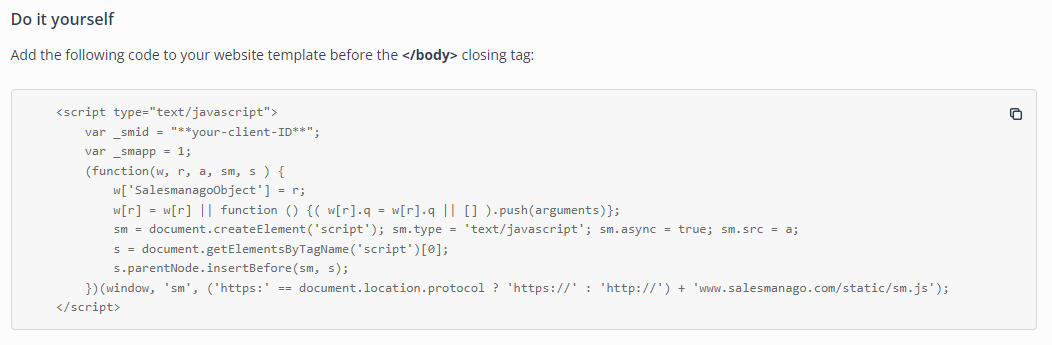
You can find your Monitoring Code in Manago AI ➔ Integration Center ➔ Monitoring Code. This script should be added to your website just before the
</body> closing tag. If your website is custom-built, you should be able to easily add the Monitoring Code to the template. If your website is based on third-party software, you can try searching for “[platform name] add custom javascript”. You can also add the Monitoring Code using Google Tag Manager. To do this, log in to Manago AI account, navigate to Integration Center ➔ Monitoring Code, and click the button in Use Google Tag Manager (GTM) section.
Contact monitoring
All Contacts created with Manago AI’s Lead Generation, Live Chat, and Frontend SDK features are monitored automatically. However, for Contacts transferred via API, you must add the monitoring cookie on your side.
There are 3 ways to start Contact monitoring:
-
Creating a cookie on the backend: After receiving the response from contact/upsert method, use the value of contactId field and create a cookie with the following parameters:
name:smclient
value: value ofcontactIdfield from API response
expiration:10 years(adjust if required by local regulations)
httpSecure:false(none)
Important: If you create the cookie with httpSecure parameter set to true, the Monitoring Code will be unable to access its value. Contacts will not be monitored.
- Adding the monitoring parameter to the URL: After calling the contact/upsert method, redirect the user to URL with
?smclient=contactIdparameter, where contactId is the value received in the response. The monitoring cookie will be created automatically by the Monitoring Code.
-
Adding variable in JavaScript: After calling the contact/upsert method, add the following code to any script tag:
var _smclientid = contactId;
where contactId is the value received in the response. The monitoring cookie will be created automatically by the Monitoring Code.
API - Contact management
Adding a new contact or modifying the existing one
Sample request with basic data:
{
  "clientId": "a1b2-...-c3d4",
  "apiKey": "e5f6-...-g7h8",
  "requestTime": 1659938888000,
  "sha": "2aa3-...-e00c",

  "owner": "[email protected]",
  "contact": {
    "email": "[email protected]",
    "phone": "+15554443322",
    "name": "John Doe",
    "externalId": "U12345",
    "address": {
      "streetAddress": "Main Street 21",
      "zipCode": "90210",
      "city": "San José",
      "country": "US"
    }
  },
  "province": "California",
  "birthday": "19870605",

  "forceOptIn": true,
  "forceOptOut": false,
  "forcePhoneOptIn": false,
  "forcePhoneOptOut": true,

  "tags": [
    "T_SHIRTS",
    "SWEATERS",
    "UPSELL"
  ],
  "removeTags": [
    "FIRST_PURCHASE"
  ]
 }
Sample request with advanced fields:
{
  "clientId": "a1b2-...-c3d4",
  "apiKey": "e5f6-...-g7h8",
  "requestTime": 1659938888000,
  "sha": "2aa3-...-e00c",

  "owner": "[email protected]",
  "contact": {
    "email": "[email protected]",
    "phone": "+15554443322",
    "fax" : "+15551112233",
    "name": "John Doe",
    "externalId": "U12345",
    "state" : "PROSPECT",
    "address": {
      "streetAddress": "Main Street 21",
      "zipCode": "90210",
      "city": "San José",
      "country": "US"
    }
  },
  "province": "California",
  "birthday": "19870605",

  "forceOptIn": true,
  "forceOptOut": false,
  "emailTracking": true,
  "defaultOptStatus": false,
  "forcePhoneOptIn": false,
  "forcePhoneOptOut": true,
  "whatsAppOptStatus": true,
  "useApiDoubleOptIn": true,
  "doubleOptInLanguage": "ES",

  "newEmail": "[email protected]",

  "tags": [
    "T_SHIRTS",
    "SWEATERS",
    "UPSELL"
  ],
  "removeTags": [
    "FIRST_PURCHASE"
  ],

  "properties": {
    "t_shirt_size": "XL",
    "gender": "Male"
  },
  "dictionaryProperties": [
    {
      "name": "member_since",
      "type": "DATE",
      "value": 1459938888000
    },
    {
      "name": "shoe_size",
      "type": "NUMBER",
      "value": 10
    }
  ],

  "consentDetails": [
    {
      "consentName": "TERMS_OF_SERVICE",
      "consentAccept": true,
      "agreementDate": 1659938888000,
      "ip": "192.168.0.1",
      "optOut": false,
      "consentDescriptionId": 1234
    },
    {
      "consentName": "PHYSICAL_MAIL",
      "consentAccept": false,
      "agreementDate": 1659938888000,
      "ip": "192.168.0.1",
      "optOut": true,
      "consentDescriptionId": 5678
    }
  ]
}
Sample response:
{
  "contactId" : "1a2b-...-3c4d",
  "message" : [],
  "success" : true,
  "externalId": "U12345"
}
Use this endpoint to create a new Contact or update an existing one:
https://xxx.manago.ai/api/contact/upsert
Basic fields:
The only mandatory fields are the authentication fields, the owner field and the email address (or ID) of the Contact. However, to unlock the full potential of Manago AI, you can send more Contact data. Later you will then use it in Automation Processes, personalization, segmentation, and other features.
| Field | Max. length | Description |
|---|---|---|
| owner* | 255 | Contact’s owner (Manago AI user account email) |
| contact | object | Object containing basic Contact’s data |
| name | 255 | Contact name |
| email* | 254[?] | Contact email |
| contactId | UUID | Contact ID from Manago AI; you will receive it in response to each request when adding or modifying a Contact. If you identify the Contact using contactId, the email field is optional. |
| phone | 255 | Contact phone number |
| fax | 255 | Contact fax number |
| company | 255 | Contact company |
| externalId | 255 | External Contact identifier, e.g. user identifier from the eCommerce platform |
| birthday | 8 | Contact’s date of birth, sent in the form of a string: yyyyMMdd or MMdd where yyyy – a four-digit year, MM – a two-digit month, dd – a two-digit day |
| address | object | Object containing Contact’s address |
| streetAddress | 255 | Street address and apartment number |
| zipCode | 255 | Zip code (post code) |
| city | 255 | Town/city |
| country | 255 | Country, the alpha-2 ISO 3166-1 format is recommended |
| province | 255 | Administrative division within a country, e.g. California |
Contact’s consents:
New Contacts added to Manago AI have their Email Marketing status set by default to opt-in, while Mobile Marketing status is set to opt-out. This is useful when you integrate a newsletter subscription form. However, if you transfer contacts from another form, where giving consents is not obligatory, remember to change the statuses of the consents.
| Field | Max. length | Description |
|---|---|---|
| forceOptIn | true/false | Flag indicating consent to Email Marketing |
| forceOptOut | true/false | Flag indicating withdrawal of consent to Email Marketing |
| emailTracking | true/false | Flag indicating whether email tracking is enabled for the Contact |
| defaultOptStatus | true/false | Flag indicating the fallback behavior for inconsistent marketing consent settings:
|
| useApiDoubleOptIn | true/false | Flag indicating if the opt-in status should be confirmed using double opt-in. This applies only to contacts changing their status to opt-in. |
| doubleOptInLanguage | 255 | Contact’s language to be used when sending double opt-in email |
| forcePhoneOptIn | true/false | Flag indicating consent to Mobile Marketing |
| forcePhoneOptOut | true/false | Flag indicating withdrawal of consent to Mobile Marketing |
| whatsAppOptStatus | true/false | Flag indicating consent status for WhatsApp communication:
|
You can also send other types of consents to Manago AI, e.g. Consent to the Terms of Service or consent to traditional marketing mailing. For this purpose, use custom consents. Define them in Manago AI Settings ➔ Other ➔ Consents List. You can update the consent description, which will create a newer version and overwrite the existing one. Manago AI stores the information which version of the consent has been given/rejected by the Contact.
Using the consentAccept and optOut fields you can set one of three consent statuses on the Contact Card. To do this, send the appropriate consentAccept and optOut flags:
- consentAccept=false, optOut=false – consent not confirmed,
- consentAccept=true, optOut=false – consent confirmed,
- consentAccept=false, optOut=true – consent withdrawn,
- consentAccept=true, optOut=true – consent withdrawn.
If a contact already has a “confirmed” or “withdrawn” consent status - it cannot be changed to a “not confirmed” status.
| Field | Max. length | Description |
|---|---|---|
| consentDetails | array of objects | Array of objects containing additional consents given by the Contact. Each consent type must be predefined in Manago AI Settings ➔ Other ➔ Consents List. |
| consentName | 30 | Name of the consent |
| consentAccept | true/false | Boolean value of consent (true or false) |
| agreementDate | UNIX timestamp [ms] | Date of consent. If you do not send this date, the consent will be assigned with the current timestamp. |
| ip | 255 | IP address of the Contact. |
| optOut | true/false | Boolean value of consent withdrawal (true or false). |
| consentDescriptionId | int | Consent description identifier. You can find this identifier in Manago AI Settings ➔ Other ➔ Consents List. |
Additional Contact details
There are three ways to transfer additional Contact details that you can use in Automation Processes, personalization, segmentation, and other features. Enrich your data using:
1. Tags — the most basic additional information. They only have value, so you can assign multiple tags within the same area, e.g. DOG_FOOD, CAT_FOOD.
2. Standard details — more elaborate type of additional information. Standard details are text-based pairs consisting of keys and values, e.g. detail name: trip_direction, value: Bulgaria, or detail name: car_brand, value: TESLA. Both the key and the value can be up to 255 characters long. They don’t have to be predefined in Manago AI.
3. Dictionary details—similar to standard details. They are pairs consisting of keys and values, with support for number and date values, e.g. detail name: wedding_date, value 1653861600000 (i.e. May 30, 2022), or detail name: shirt_size, value: 12. Dictionary details are defined system-wide, meaning that if you define a dictionary detail for one contact, the detail field will be created for all contacts. You can see the list of dictionary details in Manago AI Settings ➔ Other ➔ Dictionary Details.
| Field | Max. length | Description |
|---|---|---|
| tags | 255/tag | Array of tags to be assigned to a Contact. Tags can contain standard Latin alphabet characters and underscore characters. If the transferred tags contain unsupported characters, they will be automatically adjusted to the format supported by the system. Special characters will be replaced with the underscore character (_), and diacritical characters will be replaced with their Latin alphabet equivalent. |
| removeTags | 255/tag | Array of tags to be removed. Adding the same tag to both arrays, will remove the tag completely. |
| properties | 255/detail | Array of standard details specified as key-value pairs. It’s not recommended to use special characters, diacritics, or spaces in detail names. |
| dictionaryProperties | array of objects | Array of objects containing dictionary details definitions. Dictionary details might contain number or date values. If you define a dictionary detail for one contact, the detail will be defined for all contacts. |
| name | 3-255 | Detail name. It’s not recommended to use special characters, diacritics, or spaces in the details names. |
| type | enum NUMBER, DATE |
Dictionary detail type: NUMBER or DATE |
| value | 255 | Dictionary detail value. For type NUMBER: Positive integer. For type DATE: Unix timestamp [ms] value. |
Advanced fields:
You can use advanced fields to change the Contact’s email address or state, send a specific subscription confirmation message or decide how the request is processed.
| Field | Max. length | Description |
|---|---|---|
| newEmail | 254[?] | New email address (if you want to modify it). Changing the email address of a contact is only possible if the contact is identified with the current email address. |
| async | true/false | A parameter specifying how to add a Contact to Manago AI. The default and recommended value is “true”, the selection of which will initiate the execution of the process asynchronously. This means that you will receive the contactId value immediately, while the Contact data will be updated with a slight delay. If you choose to process the Contact synchronously, your request may take more than 1000 ms. |
| state | enum CUSTOMER, PROSPECT, PARTNER, OTHER, UNKNOWN |
Contact status (CUSTOMER, PROSPECT, PARTNER, OTHER, UNKNOWN). |
| doubleOptInEmailId** | 255 | Optional ID of email for double opt-in |
As a result of request you will receive:
| success - boolean value informing about the result of request (successful/not successful) | |
| contactId - unique ID of the Contact. In most cases this identifier should be set as smclient cookie in the Contact’s browser | |
| message - array of additional information containing error messages | |
| externalId - external contact identifier | |
| The useApiDoubleOptIn flag overrides the forceOptIn flag. Using useApiDoubleOptIn together with forceOptIn with cause forceOptIn to be ignored. |
Asynchronous adding or modifying many contacts simultaneously
Sample request data structure:
{
  "clientId": "your-client-id-123",
  "apiKey": "your-api-key-123",
  "requestTime": 1348046897664,
  "sha": "8d893f41dd479bb0489686f04b0a169005d22559",
  "owner": "[email protected]",
  "upsertDetails": [
    {
      "newEmail": null,
      "contact": {
        "email": "[email protected]",
        "name": "Test1",
        "phone": "+48123321123",
        "fax": "+48345543345",
        "company": "Benhauer Sp. z o.o. Sp. K.",
        "externalId": null,
        "address": {
          "streetAddress": "Brzyczynska 123",
          "zipCode": "43-305",
          "city": "Krakow",
          "country": "PL"
        }
      },
      "relation" : {
        "type": "PARENT",
        "email": "[email protected]"
      },
      "tags": [
        "API",
        "ADmanago"
      ],
      "removeTags": [
        "Test_tag",
        "New"
      ],
      "properties": {
        "custom.nickname": "Konri1",
        "custom.sex": "M"
      },
      "dictionaryProperties": [
        {
          "name": "birthday",
          "type": "DATE",
          "value": 1488927600000
        },
        {
          "name": "visits",
          "type": "NUMBER",
          "value": 42
        }
      ],
      "birthday": "19801017",
      "province": "Małopolska",
      "forceOptIn" : true,
      "forceOptOut" : false,
      "emailTracking": true,
      "forcePhoneOptIn" : true,
      "forcePhoneOptOut" : false
    },
    {
      "contact": {
        "email": "[email protected]",
        "name": "Test2",
        "phone": "+48123321123",
        "fax": "+48345543345",
        "company": "Benhauer Sp. z o.o. Sp. K.",
        "externalId": null
      },
      "newEmail": "[email protected]",
      "forceOptIn": true,
      "forceOptOut": false,
      "emailTracking": false,
      "forcePhoneOptIn": true,
      "forcePhoneOptOut": false,
      "tags": [
        "API",
        "ADmanago"
      ],
      "properties": {
        "custom.nickname": "Konri2",
        "custom.sex": "M"
      },
      "consentDetails": [
        {
          "consentName": "AGREEMENT",
          "consentAccept": true,
          "agreementDate": 1391167515515,
          "ip":"192.168.7.139",
          "optOut": false,
          "consentDescriptionId": 1
        }
      ],
      "birthday": "19801017",
      "province": "Małopolska"
    }
  ],
  "useApiDoubleOptIn": true,
  "lang": "PL",
  "fireEvents": false
}
Result of request:
{
  "success":true,
  "message":["Batch upsert added to execute."],
  "requestId":37
}
Exemplary json with the batchupsert status:
{
  "clientId": "yourclientID",
  "apiKey": "yourAPIkey",
  "requestTime": 1500556989,
  "sha": "4afd12754c746fa9f71648f2e2276ae40eccfe41",
  "owner": "[email protected]",
  "requestId": 37
}
Exemplary response:
{
  "success": true,
  "message": [],
  "fileUrl": "https://salesmanago.s3.amazonaws.com/ye4vodnswfo6zp75/36m0iryqk4wlt6wu/1bau18werv4ixk0d.json?AWSAccessKeyId=AKIAJS5TR7Z2ERLL5DIQ&Expires=1510133411&Signature=YUm1NsYMenpTdl4MC9cxDk%2Ba2nA%3D"
}
We add or modify many contacts at the same time using the below method:
https://xxx.manago.ai/api/contact/batchupsertv2
In the request we provide an array of contacts in the upsertDetails field. Basic elements that can be provided in contact array element can be found above in the description of the upsert method (see Adding a new contact or modifying the existing contact).
Available fields in the request batchupsertv2 method:
| Field | Max. length | Description |
|---|---|---|
| owner* | 255 | contact’s owner (Manago AI user account email) |
| upsertDetails* | 1000 | Array of Contact objects |
| 254[?] | contact email | |
| contactId | UUID | Contact ID from Manago AI; you will receive it in response to each request when adding or modifying a Contact. If you identify the Contact using contactId, the email field is optional. |
| name | 255 | contact name |
| phone | 255 | phone number |
| fax | 255 | fax number |
| company | 255 | contact company |
| state | 255 | contact’s state (CUSTOMER, PROSPECT, PARTNER, OTHER, UNKNOWN) |
| externalId | 255 | External contact ID |
| newEmail | 254[?] | new contact’s email |
| birthday | yyyyMMdd/Mmdd | date of contact companybirth, sent as a string of signs in the form: yyyyMMdd or Mmdd (yyyy – a 4-digit year, MM – a two-digit month, dd – a two-digit day) |
| province | 255 | contact’s province |
| streetAddress | 255 | street and house number |
| zipCode | 255 | zip code |
| city | 255 | town/city |
| country | 255 | country |
| forceOptOut | true/false | forcing opt-out after adding/modification |
| forceOptIn | true/false | forcing opt-in after adding/modification (if the previous option has not been chosen) |
| emailTracking | true/false | Flag indicating whether email tracking is enabled for the Contact |
| forcePhoneOptOut | true/false | forcing opt-out from a phone after adding/modification |
| forcePhoneOptIn | true/false | forcing opt-in to a phone after adding/modification (if the previous option has not been chosen) |
| tags | 255/tag | array of contact’s tags |
| removeTags | 255/tag | array of tags to be removed |
| properties | 255/detal | contact attributes defined by the user. It is advised not to use special characters and spaces in the name, but it is allowed |
| dictionaryProperties | - | Dictionary details assigned to the Contact. The dictionary detail must already exist in SALESmanago. To update an existing dictionary detail for a Contact, send the same name and type with a new value. |
| name | 255 | name |
| type | NUMBER or DATE | type |
| value | - | integer greater than 0, for a DATE timestamp type, with the time set to 00:00:00 UTC time |
| useApiDoubleOptIn | true/false | use double opt-in option, default true |
| lang | 255 | contact language |
| fireEvents | true/false | If the method is set to “false” it prevents the rules and Workflows triggered by events created during the contact upsert (import with overwriting and modification of existing contacts) from launching |
For users with permissions to Contact relationship, we additionally have the following fields:
| Field | Max. length | Description |
|---|---|---|
| relation | - | creates a relationship with the specified contact |
| type | CHILD or PARENT | relation type |
| 254[?] | e-mail of the contact with whom the relationship is to be created, the given contact must already exist in the system |
In response, in “requestId” field, you will receive a number with which you can monitor the upsert status.
To check the process status, you need to send a request to:
https://xxx.manago.ai/api/job/status
You need to give requestId as in example.
In response, you will receive either the message about the progress of the upsert or a link to the file with updated contacts.
Link is active for several minutes only.
success – boolean value informing about the result of request (successful/not successful)
contactIds – unique ID of the updated or newly added contact
message – array of additional information enabling error identification
invalidContacts – array of invalid contacts
For new contacts, the “newEmail” field will be ignored. New contacts will be assigned an address that matches the data in the field: “email.”
The useApiDoubleOptIn flag overrides the forceOptIn flag.
Using useApiDoubleOptIn together with forceOptIn will cause forceOptIn to be ignored.
Deleting many contacts simultaneously
Sample structure of request data:
{
  "clientId": "a1b2-...-c3d4",
  "apiKey": "e5f6-...-g7h8",
  "requestTime": 1659938888000,
  "sha": "2aa3-...-e00c",

  "owner": "[email protected]",
  "contacts": [
    {
      "addresseeType": "EMAIL",
      "value": "[email protected], [email protected]"
    },
    {
      "addresseeType": "STAGE",
      "value": "FunnelName",
      "optValue": "Stage1, Stage2"
    }
  ]
}
We delete many contacts at the same time using the below method:
https://xxx.manago.ai/api/contact/batchDelete
Available fields in the request batchDelete method:
| Field | Max. length | Description |
|---|---|---|
| owner* | 255 | contact’s owner (Manago AI user account email) |
| contacts* | - | array of contacts to delete |
| addresseeType* | 255 | addressing emails type ( EMAIL, CONTACT_ID, TAG, FUNNEL, STAGE) |
| value | 255 | Refer to Contact selectors for more details. |
| optValue | 255 | Refer to Contact selectors for more details. |
Result of request:
{
  "success":true,
  "message":[],
  "result": "Contacts deleted"
}
As a result of request we receive:
success – boolean value informing about the result of request (successful/not successful)
contactIds – array of additional information enabling error identification
result – result of request
Deleting a contact
Sample request data structure:
{
 "apiKey" : "your-api-key-123",
 "clientId" : "your-client-id-123",
 "sha" : "08924f45afc2e4fb8b652c53cdb493c7ddb846a1",
 "requestTime" : 1327059355361,
 "email" : "[email protected]",
 "owner" : "[email protected]"
}
We delete a contact using the below method:
https://xxx.manago.ai/api/contact/delete
Available fields in the request delete method:
| Field | Max. length | Description |
|---|---|---|
| owner* | 255 | contact’s owner (Manago AI user account email) |
| email* | 254[?] | contact email |
Result of request:
{
  "success": true,
  "message": [],
  "result": "Contact deleted"
}
As a result of request we receive:
success – boolean value informing about the result of request (successful/not successful)
message – array of additional information enabling error identification
result - additional information enabling error identification
Checking if a contact is already recorded
Sample request data structure:
{
  "clientId": "client-id",
  "apiKey": "api-key-123",
  "requestTime": 1481532212995,
  "sha": "abcd509ac6867955a5333d6eb0c460455c74ccc6",
  "email": "***@gmail.com",
  "owner": "[email protected]"
}
To check if a contact is already recorded in the database we use the below method:
https://xxx.manago.ai/api/contact/hasContact
Available fields in the request hasContact method:
| Field | Max. length | Description |
|---|---|---|
| owner* | 255 | contact’s owner (Manago AI user account email) |
| email* | 254[?] | contact’s email |
Result of request:
{
  "success": true,
  "message": [],
  "result": true,
  "contactId": "99cdc5fe-7376-436e-acb5-7180c97dadb6"
}
As a result of request we receive:
success – boolean value informing about the result of request (successful/not successful)
message – array of additional information enabling error identification
result - result of request
contactId - ID of the matching Contact. Returned when the Contact is found.
Export basic contacts’ data by email address
Sample request data structure:
{
  "clientId": "client-id-123",
  "apiKey": "api-key-123",
  "requestTime": 1481533177752,
  "sha": "abcd56045567955a533c74ccc6683d09ac6eb0c4",
  "owner": "[email protected]",
  "email": [
    "piotr***@gmail.com"
  ]
}
The list of basic contacts data export by calling:
https://xxx.manago.ai/api/contact/basic
Available fields in the request basic method:
| Field | Max. length | Description |
|---|---|---|
| owner* | 255 | contact’s owner (Manago AI user account email) |
| email* | 254[?] | array of contacts email for the exported contacts |
Result of request:
{
  "success": true,
  "message": [],
  "contacts": [
    {
      "name": "Piotr",
      "email": "piotr****@gmail.com",
      "phone": "500100100",
      "fax": "",
      "score": 1920,
      "state": "PROSPECT",
      "optedOut": false,
      "emailTracking": true,
      "optedOutPhone": false,
      "deleted": false,
      "invalid": false,
      "company": "Benhauer",
      "externalId": null,
      "address": {
        "streetAddress": "Grzegórzecka 21",
        "zipCode": "30-555",
        "city": "Kraków",
        "country": "Polska"
      },
      "contactId": "99cdc5fe-7376-436e-acb5-7180c97dadb6",
      "birthdayYear": null,
      "birthdayMonth": null,
      "birthdayDay": null,
      "modifiedOn": 1479215570000,
      "createdOn": 1432887727000,
      "lastVisit": 1481528930000
    }
  ]
}
success – information whether export was successful
message – array of additional information enabling error identification
contacts – exported contacts
name – contact name
email – contact email
phone – contact phone number
fax – contact’s fax number
score – number of points
state – contact’s state (CUSTOMER, PROSPECT, PARTNER, OTHER, UNKNOWN)
optedOut – information whether the contact is unsubscribed from the mailing list
emailTracking – information whether email tracking is enabled for the Contact
optedOutPhone - information if the contact is unsubscribed from sending sms
deleted – information if the contact is deleted
invalid – information if the contact is invalid
company – contact company name
externalId – contact external id
address – contact’s address
streetAddress – street and house number
zipCode – zip code
city – town/city
country – country
contactId - contact id
birthdayYear – contact birthday year
birthdayMonth – contact birthday month
birthdayDay – contact birthday day
modifiedOn – last contact update date
createdOn – contact creation date
lastVisit – last visit contact date
Export basic contacts’ data by contact ID
Sample request data structure:
{
  "clientId": "client-id-123",
  "apiKey": "api-key-123",
  "requestTime": 1481535098734,
  "sha": "abcd56045567955a533c74ccc6683d09ac6eb0c4",
  "owner": "[email protected]",
  "id": [
    "99cdc5fe-7376-436e-acb5-7180c97dadb6"
  ]
}
The list of basic contacts data export by calling:
https://xxx.manago.ai/api/contact/basicById
Available fields in the request basicById method:
| Field | Max. length | Description |
|---|---|---|
| owner* | 255 | contact’s owner (Manago AI user account email) |
| id* | 255 | array of identifiers for the exported contacts |
Result of request:
{
  "success": true,
  "message": [],
  "contacts": [
    {
      "name": "Piotr",
      "email": "piotr****@gmail.com",
      "phone": "500100100",
      "fax": "",
      "score": 1920,
      "state": "PROSPECT",
      "optedOut": false,
      "emailTracking": true,
      "optedOutPhone": false,
      "deleted": false,
      "invalid": false,
      "company": "Benhauer",
      "externalId": null,
      "address": {
        "streetAddress": "Grzegórzecka 21",
        "zipCode": "30-555",
        "city": "Kraków",
        "country": "Polska"
      },
      "contactId": "99cdc5fe-7376-436e-acb5-7180c97dadb6",
      "birthdayYear": null,
      "birthdayMonth": null,
      "birthdayDay": null,
      "modifiedOn": 1479215570000,
      "createdOn": 1432887727000,
      "lastVisit": 1481528930000
    }
  ]
}
success – information whether export was successful
message – array of additional information enabling error identification
contacts – exported contacts
name – contact name
email – contact email
phone – contact phone number
fax – contact’s fax number
score – number of points
state – contact’s state (CUSTOMER, PROSPECT, PARTNER, OTHER, UNKNOWN)
optedOut – information whether the contact is unsubscribed from the mailing list
emailTracking – information whether email tracking is enabled for the Contact
optedOutPhone - information if the contact is unsubscribed from sending sms
deleted – information if the contact is deleted
invalid – information if the contact is invalid
company – contact company name
externalId – External Contact identifier, if assigned.
address – contact’s address
streetAddress – street and house number
zipCode – zip code
city – town/city
country – country
contactId - contact id
birthdayYear – contact birthday year
birthdayMonth – contact birthday month
birthdayDay – contact birthday day
modifiedOn – last contact update date
createdOn – contact creation date
lastVisit – last visit contact date
Export based on email address for the owner
Sample structure of request data:
{
  "apiKey" : "your-api-key-123",
  "clientId" : "your-client-id-123",
  "email" : [ "****@gmail.com" ],
  "owner" : "[email protected]",
  "requestTime" : 1329128188409,
  "sha" : "02bfe70541d3907cf487f26dc2665b184b1221a7"
}
We export contacts using the below method:
https://xxx.manago.ai/api/contact/list
Available fields in the request list method:
| Field | Max. length | Description |
|---|---|---|
| owner* | 255 | contact’s owner (Manago AI user account email) |
| email* | 254[?] | array of contacts email for the exported contacts (** up to 50 contacts at once **) |
Result of request:
{
  "success": true,
  "message": [],
  "contacts": [
    {
      "id": "99cdc5fe-7376-436e-acb5-7180c97dadb6",
      "name": "Konrad",
      "email": "[email protected]",
      "phone": "123456789",
      "fax": "987654321",
      "score": 775,
      "state": "PROSPECT",
      "optedOut": true,
      "emailTracking": true,
      "optedOutPhone": false,
      "deleted": false,
      "invalid": false,
      "company": "Benhauer",
      "address": {
        "streetAddress": "Grzegórzecka 21",
        "zipCode": "",
        "city": "Kraków",
        "country": "Polska"
      },
      "birthdayYear": 2000,
      "birthdayMonth": 1,
      "birthdayDay": 1,
      "province": "Małopolska",
      "mainContactOwner": "[email protected]",
      "modifiedOn": 1479209074000,
      "createdOn": 1432887727000,
      "purchaseProbability": 0.3541016524943863,
      "contactVisits": [
        {
          "conversationIntId": null,
          "host": "10.10.10.10",
          "time": 1328050810504,
          "duration": null,
          "visitSource": "NEXT",
          "visitSourceHost": "manago.ai",
          "visitSourceKeywords": null,
          "visitScore": 1,
          "url": "/test.htm",
          "location": null
        }
      ],
      "contactTags": [
        {
          "tag": "ADMANAGO",
          "tagName": "ADMANAGO",
          "score": 12,
          "createdOn": 1432887757000,
          "tagWithScore": "ADMANAGO (1)"
        }
      ],
      "emailMessages": [
        {
          "name": "Email",
          "subject": "Subject",
          "date": 1479209121000,
          "sent": false,
          "dateSent": null,
          "opened": false,
          "dateOpened": null,
          "clicked": false,
          "dateClicked": null,
          "emailConversation": 25584162,
          "intId": null,
          "deliveryStatus": null
        }
      ],
      "properties": [
        {
          "name": "detail",
          "value": "detail-value"
        }
      ],
      "contactFunnels": [
        {
          "salesFunnel": "SalesFunnel 1",
          "salesFunnelId": "5561397c-9792-4b60-aed1-a045b86c6b13",
          "salesStage": "Stage",
          "salesStageId": "de0cf594-b999-438a-b1f0-8578c36a8da5"
        }
      ],
      "contactNotes": [
        {
          "note": "Note",
          "date": 1479208770000,
          "priv": false
        }
      ],
      "contactTasks": [
        {
          "id": "395c5276-a40f-417c-bee8-1d6e80373adb",
          "note": "Task",
          "date": 1479250800000,
          "cc": "",
          "reminder": 1479249900000
        }
      ],
      "contactExtEvents": [
        {
          "eventId": "bd2fd558-29da-49b7-be31-6ee551cd5e13",
          "date": 1433449419000,
          "description": "Cart",
          "products": "7,6",
          "location": null,
          "value": 57.69,
          "contactExtEventType": "CART",
          "shopDomain":"shop.manago.ai",
          "detail1": null,
          "detail2": null,
          "detail3": null,
          "detail4": null,
          "detail5": null,
          "detail6": null,
          "detail7": null,
          "detail8": null,
          "detail9": null,
          "detail10": null,
          "detail11": null,
          "detail12": null,
          "detail13": null,
          "detail14": null,
          "detail15": null,
          "detail16": null,
          "detail17": null,
          "detail18": null,
          "detail19": null,
          "detail20": null,
          "externalId": null
        }
      ],
      "coupons": [
        {
          "name": "Coupon",
          "coupon": "SB173",
          "validTo": 1480245622000,
          "used": false
        }
      ],
      "mobileMessages": [
        {
          "name": "Spring SMS campaign",
          "channelType": "SMS",
          "delivered": true,
          "sender": "[email protected]",
          "source": "WORKFLOW",
          "sourceName": "Spring campaign",
          "sendDate": 1659938888000
        }
      ],
      "consents": [
        {
          "name": "ZGODA_1",
          "description": "Description1",
          "ip": "0:0:0:0:0:0:0:1",
          "action": "A",
          "createdOn": 1546730871000,
          "source": "F",
          "dateOn": 1546730873000
        },
        {
          "name": "ZGODA_2",
          "description": "Description2",
          "ip": "0:0:0:0:0:0:0:1",
          "action": "D",
          "createdOn": 1546730871000,
          "source": "C",
          "dateOn": 1546730873000
        },
        {
          "name": "ZGODA_3",
          "description": "Description3",
          "ip": "0:0:0:0:0:0:0:1",
          "action": "R",
          "createdOn": 1546730871000,
          "source": "CC,",
          "dateOn": 1546730873000
        }
      ]
    }
  ]
}
As a result of request we receive:
success – information whether export was successful
message – array of additional information enabling error identification
contacts – exported contacts
id – contact ID
name – contact name
email – contact email
phone – contact phone number
fax – contact’s fax number
score – number of points
state – contact’s state (CUSTOMER, PROSPECT, PARTNER, OTHER, UNKNOWN)
optedOut – information whether the contact is unsubscribed from the mailing list
emailTracking – information whether email tracking is enabled for the Contact
optedOutPhone - information if the contact is unsubscribed from sending sms
deleted – information if the contact is deleted
invalid – information if the contact is invalid
company – contact company name
externalId – contact external ID
address – contact’s address
streetAddress – street and house number
zipCode – zip code
city – town/city
country – country
birthdayYear – contact birthday year
birthdayMonth – contact birthday month
birthdayDay – contact birthday day
province - contact’s province
mainContactOwner – contact’s main contact owner ID
modifiedOn – last contact update date
createdOn – contact creation date
purchaseProbability – prediction value of purchase occurrence
contactVisits – contact visits
conversationIntId – ID of mailing the visit comes from
host - page visited by the contact
time - time of visit
duration - duration
visitSource – source of visit, possible values of this field include:
EMAIL_CONVERSATION - visit from an email (clicked link)
SEARCH_ENGINE - entering from visit from a search engine
ADVERTISEMENT - entering from visit from an ad box (AdWords)
REFERRER - entering from visit from a referring website
DIRECT - direct entrance or moving to next page
visitSourceHost - referring host (referrer)
visitSourceKeywords - keywords
visitScore – number of points
url – URL of visited page
location - location
contactTags – contact tags
tag – tag text
tagName – tag name
score – tag score
createdOn – tag creation date
tagWithScore – tag name with score
emailMessages – emails from the past 3 months
name – message name
subject – message subject
date – message creation date
sent – information if the email has been sent
dateSent – message sent date
opened – information if the email has been opened
dateOpened – message opened date
clicked – information if the email has been clicked
dateClicked – message clicked date
emailConversation – conversation ID
deliveryStatus – delivery status
properties – contact details
name – detail name
value – detail value
contactFunnels – contact sales funnels
salesFunnel – funnel name
salesFunnelId – funnel id
salesStage – funnel stage name
salesStageId – funnel stage ID
contactNotes - notes
note – note content
date – note creation date
priv – information if note is private
contactTasks – events
id – event ID
note – event content
date – event creation date
cc – carbon copy of email reminder
reminder – reminder date
contactExtEvents – external events
eventId – external event ID
date – event date
description – event description
products – value of “product” field ( e.g. product ID’s)
location – localization
value – event value
contactExtEventType – event type
shopDomain – optional shop domain
detail1-20 – event detail (max 20)
externalId – event external ID
coupons - coupons
name – coupon name
coupon – string of coupon marks
validTo – coupon valid date
used – information if coupon has been used
mobileMessages – list of text messages sent to a Contact
name – name of the used text message template
channelType – text message channel (SMS/WHATS_APP/VIBER)
delivered – boolean value informing if the text message was delivered (status from the gateway provider)
sender – Manago AI user to whom the message was assigned to
source – Origin of the message (MASS/WORKFLOW/AUTOMATION_RULE)
sourceName – Name of the Automation Process
sendDate – UNIX timestamp in ms when the message was sent
consents - consents
name - consent name
description - consent description
ip - source ip from which the action was performed on a consent
action - A - consent confirmation, D - consent removal, R - consent rejection
createdOn - date of creation
dateOn - date of consent activation
source - source of consent - API - api, C - chat, F - form, CC - contact card
Export Contacts by Contact ID
Sample request:
{
  "clientId": "a1b2-...-c3d4",
  "apiKey": "e5f6-...-g7h8",
  "requestTime": 1659938888000,
  "sha": "2aa3-...-e00c",


  "owner": "[email protected]",
  "contactId" : ["ab12-...-cd34", "ef56-...-ab78"]
}
To export Contacts by Contact ID, use the following method:
https://xxx.manago.ai/api/contact/listById
Fields available in listById method:
| Field | Max. length | Description |
|---|---|---|
| owner* | 255 | Contacts’ owner (Manago AI user account email) |
| contactId* | 50*36 | Array of IDs (UUID) for the Contacts to be exported (** maximum 50 IDs per request **) |
Sample response:
{
  "success": true,
  "message": [],
  "contacts": [
    {
      "id": "ab12-...-cd34",
      "name": "John Doe",
      "email": "[email protected]",
      "phone": "+15554443322",
      "fax" : "+15551112233",
      "score": 777,
      "state": "PROSPECT",
      "optedOut": true,
      "emailTracking": true,
      "optedOutPhone": false,
      "deleted": false,
      "invalid": false,
      "company": "Acme Corporation",
      "externalId": "U12345",
      "address": {
        "streetAddress": "Main Street",
        "zipCode": "AB 00000",
        "city": "Anytown",
        "country": "United States"
      },
      "birthdayYear": 1987,
      "birthdayMonth": 6,
      "birthdayDay": 5,
      "province": "California",
      "mainContactOwner": "[email protected]",
      "modifiedOn": 1659938888000,
      "createdOn": 1459938888000,
      "purchaseProbability": 0.314159265359,
      "contactVisits": [
        {
          "conversationIntId": null,
          "host": "192.168.1.1",
          "time": 1659938888000,
          "duration": null,
          "visitSource": "NEXT",
          "visitSourceHost": "example.com",
          "visitSourceKeywords": null,
          "visitScore": 1,
          "url": "/example.html",
          "location": null
        }
      ],
      "contactTags": [
        {
          "tag": "SWEATERS",
          "tagName": "SWEATERS",
          "score": 3,
          "createdOn": 1459938888000,
          "tagWithScore": "SWEATERS (3)"
        }
      ],
      "emailMessages": [
        {
          "name": "Special discount code",
          "subject": "Special prize for you 🎁 Redeem before it's gone 😍",
          "date": 1659938888000,
          "sent": true,
          "dateSent": 1659938888000,
          "opened": true,
          "dateOpened": 1659939999000,
          "clicked": false,
          "dateClicked": null,
          "emailConversation": 123456,
          "intId": null,
          "deliveryStatus": null
        }
      ],
      "properties": [
        {
          "name": "sweater_size",
          "value": "XL"
        }
      ],
      "contactFunnels": [
        {
          "salesFunnel": "Example funnel",
          "salesFunnelId": "1234-...-5678",
          "salesStage": "Example stage",
          "salesStageId": "abcd-...-efab"
        }
      ],
      "contactNotes": [
        {
          "note": "Example note",
          "date": 1659938888000,
          "priv": false
        }
      ],
      "contactTasks": [
        {
          "id": "1234-...-5678",
          "note": "Example task",
          "date": 1659938888000,
          "cc": "",
          "reminder": 1659939999000
        }
      ],
      "contactExtEvents": [
        {
          "eventId": "ab12-...-cd34",
          "date": 1659938888000,
          "description": "https://example.com/cartRecovery/controller/cartId=1234-5678-9098",
          "products": "p0123, p4567",
          "location": "examplecom",
          "value": 189.99,
          "contactExtEventType": "PURCHASE",
          "shopDomain":"example.com",
          "detail1": "1,4,1",
          "detail2": "189.99",
          "detail3": "dresses",
          "detail4": "black,black,white",
          "detail5": null,
          "detail6": null,
          "detail7": null,
          "detail8": null,
          "detail9": null,
          "detail10": null,
          "detail11": null,
          "detail12": null,
          "detail13": null,
          "detail14": null,
          "detail15": null,
          "detail16": null,
          "detail17": null,
          "detail18": null,
          "detail19": null,
          "detail20": null,
          "externalId": "ID-123456"
        }
      ],
      "coupons": [
        {
          "name": "10% Voucher",
          "coupon": "A1B2C3D4",
          "validTo": 1659939999000,
          "used": false
        }
      ],
      "mobileMessages": [
        {
          "name": "Spring SMS campaign",
          "channelType": "SMS",
          "delivered": true,
          "sender": "[email protected]",
          "source": "WORKFLOW",
          "sourceName": "Spring campaign",
          "sendDate": 1659938888000
        }
      ],
      "consents": [
        {
          "name": "TERMS_OF_SERVICE",
          "description": "I hereby accept TOS",
          "ip": "192.168.0.1",
          "action": "A",
          "createdOn": 1659938888000,
          "source": "F",
          "dateOn": 1546730873000
        },
        {
          "name": "PHYSICAL_MAIL",
          "description": "I hereby consent to receive marketing materials by postal service",
          "ip": "192.168.0.1",
          "action": "D",
          "createdOn": 1459938888000,
          "source": "C",
          "dateOn": 1659938888000
        }
      ]
    }
  ],
  "unavailableContacts": ["ef56-...-ab78"]
}
As a result of request you will receive:
success—boolean value informing about the result of request (successful/not successful)
message—array of additional information containing error messages
contacts—array of objects with Contact data. Refer to /contact/list for more details.
emailTracking—information whether email tracking is enabled for the Contact
unavailableContacts—array of Contact IDs to which the given owner has no access
Exporting Contact data
Sample request:
{
  "clientId": "a1b2-...-c3d4",
  "apiKey": "e5f6-...-g7h8",
  "requestTime": 1659938888000,
  "sha": "2aa3-...-e00c",

  "owner": "[email protected]",
  "dateRange": {
    "startDate": 1649938888,
    "endDate": 1659938888
  },
  "contacts" : [
    {"addresseeType" : "tag", "value" : "T_SHIRTS, SWEATERS"},
    {"addresseeType" : "email", "value" : "[email protected], [email protected]"},
    {"addresseeType" : "stage", "value" : "Customer Conversion", "optValue": "Exploration"},
    {"addresseeType" : "contact_id", "value" : "1a2b-...-3c4d"},
    {"addresseeType" : "phone_opted_in"}
  ],
  "data": [
    {"dataType" : "CONTACT"},
    {"dataType" : "TAG"},
    {"dataType" : "EXT_EVENT"},
    {"dataType" : "VISITS"},
    {"dataType" : "EMAILS", "source" : "MASS"},
    {"dataType" : "MOBILE_PUSH", "source" : "WORKFLOW", "sourceId" : "a1b2-...-c3d4"},
    {"dataType" : "FUNNELS"},
    {"dataType" : "NOTES"},
    {"dataType" : "TASKS"},
    {"dataType" : "COUPONS"},
    {"dataType" : "TEXT_MESSAGES"},
    {"dataType" : "CONSENTS"},
    {"dataType" : "PROPERTIES"},
    {"dataType" : "DICTIONARY_PROPERTIES"},
    {"dataType" : "KEY_INFORMATION"},
    {"dataType" : "COMMUNICATION_PREFERENCES"}
  ]
}
Sample response:
{
  "success": true,
  "message": [
    "Export added to execute."
  ],
  "requestId": 37
}
Method used to retrieve the export file URL:
/api/job/status
See docs >>Sample file structure for all available dataTypes:
[
    {
        "1a2b-...-3c4d": {
            "contactData": {
                "email": "[email protected]",
                "id": "1a2b-...-3c4d",
                "createdOn": 1459938888000,
                "modifiedOn": 1659938888000,
                "name": "John Doe",
                "score": 123,
                "fax": "+15551112233",
                "state": "PROSPECT",
                "optedIn": true,
                "optedOut": false,
                "optedOutPhone": false,
                "phone": "+15554443322",
                "deleted": false,
                "invalid": false,
                "company": "Acme Corporation",
                "streetAddress": "Main Street",
                "zipCode": "AB 00000",
                "city": "Anytown",
                "country": "United States",
                "birthday": "1980-01-01",
                "province": "California",
                "mainOwner": "[email protected]",
                "lastOptInOn": 1659938888000,
                "lastOptOutOn": 1559938888000,
                "externalId": "ID-123456",
                "lastVisit": 1659938888000,
                "oneMessagePerWeek": false
            },
            "tagData": [
                {
                    "tagName": "T_SHIRTS",
                    "score": 12,
                    "createdOn": 1559938888000
                },
                {
                    "tagName": "SWEATERS",
                    "score": 1,
                    "createdOn": 1459938888000
                }
            ],
            "extEventData": [
                {
                    "eventId": "ab12-...-cd34",
                    "date": 1659938888000,
                    "description": "https://example.com/cartRecovery/controller/cartId=1234-5678-9098",
                    "products": "p0123, p4567",
                    "location": "examplecom",
                    "value": 189.99,
                    "contactExtEventType": "PURCHASE",
                    "detail1": "1,4,1",
                    "detail2": "189.99",
                    "detail3": null,
                    "detail4": null,
                    "detail5": null,
                    "detail6": null,
                    "detail7": null,
                    "detail8": null,
                    "detail9": null,
                    "detail10": null,
                    "detail11": null,
                    "detail12": null,
                    "detail13": null,
                    "detail14": null,
                    "detail15": null,
                    "detail16": null,
                    "detail17": null,
                    "detail18": null,
                    "detail19": null,
                    "detail20": null,
                    "externalId": "ID-123456"
                }
            ],
            "visitsData": [
                {
                    "conversationIntId": null,
                    "host": "example.com",
                    "time": 1659938888000,
                    "duration": 200,
                    "visitSource": "NEXT",
                    "visitSourceHost": "websiteexample.com",
                    "visitSourceKeywords": null,
                    "visitScore": 10,
                    "url": "/example.html",
                    "location": "https://www.example.com"
                }
            ],
            "emailsData": [
                {
                    "name": "Special discount code",
                    "subject": "We have a special prize for you! Hurry up and collect it!",
                    "date": 1659938888000,
                    "sent": true,
                    "dateSent": 1659938888000,
                    "opened": true,
                    "dateOpened": 1659939999000,
                    "clicked": false,
                    "dateClicked": null,
                    "emailConversation": "123456",
                    "deliveryStatus": null,
                    "type": null,
                    "templateExternalId": "template-123"
                }
            ],
            "funnelsData": [
                {
                    "salesFunnel": "Customer Conversion",
                    "salesFunnelId": "1234-...-5678",
                    "salesStage": "Exploration",
                    "salesStageId": "abcd-...-efab"
                }
            ],
            "notesData": [
                {
                    "note": "Example note",
                    "date": 1659938888000,
                    "priv": false
                }
            ],
            "tasksData": [
                {
                    "id": "1234-...-5678",
                    "note": "Example task",
                    "date": 1659938888000,
                    "cc": "[email protected]",
                    "reminder": 1659939999000
                }
            ],
            "couponsData": [
                {
                    "name": "10% Voucher",
                    "coupon": "A1B2C3D4",
                    "validTo": null,
                    "used": false
                }
            ],
            "smsData": [
                {
                    "createdDate": 1659938888000,
                    "dateSent": 1659938888000,
                    "dateDelivered": 1659939999000,
                    "deliveryStatus": "DELIVRD:00",
                    "dateReplied": null,
                    "replayMsg": null,
                    "content": "Welcome to Example.com"
                }
            ],
            "consentsData": [
                {
                    "name": "TERMS_OF_SERVICE",
                    "description": "Terms of service consent",
                    "sourceIp": "127.0.0.1",
                    "action": "A",
                    "createdOn": 1659938888000,
                    "source": "API",
                    "dateOn": 1659938888000
                }
            ],
            "contactPropertiesData": [
                {
                    "name": "t_shirt_size",
                    "value": "XL"
                }
            ],
            "contactDictionaryPropertiesData": [
                {
                    "name": "birthday",
                    "type": "DATE",
                    "value": "1488927600"
                },
                {
                    "name": "shoe_size",
                    "type": "NUMBER",
                    "value": "9"
                }
            ],
            "contactOptStatus": [
                {
                    "status": "OPT_IN",
                    "changedBy": "[email protected]",
                    "ip": "127.0.0.1",
                    "date": 1659938888000,
                    "action": null,
                    "changeSource": null,
                    "sourceName": null
                }
            ],
            "keyInformationData": [
                {
                    "name": "Preferred brand",
                    "value": "Victoria's Secret"
                }
            ],
            "communicationPreferencesData": [
                {
                    "cpcId": 123,
                    "cpcName": "My Preference Center",
                    "frequency": "REGULARLY",
                    "channels": [
                        "Email",
                        "SMS"
                    ],
                    "days": [
                        "Monday",
                        "Wednesday"
                    ],
                    "hours": "12:00-18:00"
                }
            ],
            "mobilePushData": [
                {
                    "name": "Example template",
                    "date": 1659928888000,
                    "sent": true,
                    "dateViewed": 1659948888000,
                    "dateClicked": 1659958888000,
                    "dateDismissed": null,
                    "os": "ANDROID",
                    "deliveryStatus": "SENT",
                    "messageType": "WORKFLOW",
                    "sourceId": "e42a6c68-e125-4b2b-866b-6f189b2ffd06",
                    "notificationId": "d04c1be8-431c-460b-89a0-f6bd08433c15"
                }
            ]
        }
    },
    {
        "2b3c-...-4d5e": {
            "contactData": {
                "email": "[email protected]",
                "id": "2b3c-...-4d5e",
                "createdOn": 1559938888000,
                "modifiedOn": 1659938888000,
                "name": "Jane Doe",
                "score": 50,
                "fax": null,
                "state": "CUSTOMER",
                "optedIn": true,
                "optedOut": false,
                "optedOutPhone": false,
                "phone": null,
                "deleted": false,
                "invalid": false,
                "company": null,
                "streetAddress": null,
                "zipCode": null,
                "city": null,
                "country": null,
                "birthday": null,
                "province": null,
                "mainOwner": "[email protected]",
                "lastOptInOn": 1659938888000,
                "lastOptOutOn": null,
                "externalId": null,
                "lastVisit": null,
                "oneMessagePerWeek": false
            },
            "tagData": [],
            "extEventData": null,
            "visitsData": null,
            "emailsData": null,
            "funnelsData": null,
            "notesData": null,
            "tasksData": null,
            "couponsData": null,
            "smsData": null,
            "consentsData": null,
            "contactPropertiesData": null,
            "contactDictionaryPropertiesData": null,
            "contactOptStatus": null,
            "keyInformationData": null,
            "communicationPreferencesData": null,
            "mobilePushData": null
        }
    }
]
This API method allows you to export selected data for selected Contacts. The scope of exported data is limited to the information specified in the request. The group of Contacts for whom data is to be exported can be specified using a range of selectors.
Endpoint:
https://xxx.manago.ai/api/contact/export/data
Fields available in the _contact/export/data_ method:
| Field | Max. length | Description |
|---|---|---|
| owner* | 255 | Owner of the Contact(s) whose data is to be exported (Manago AI user’s email) |
| dateRange.startDate+ | UNIX timestamp [s] | Export date range, with the dates provided in the UNIX timestamp format [s]. The maximum range that can be specified is 6 months. startDate cannot be later than endDate. Neither date can be in the future.Both dates are required for the TEXT_MESSAGES data scope and optional for all other data types. Explicitly setting dateRange to null results in an error.Note: To maintain backward compatibility, these fields are specified in seconds, unlike other date fields in API v2. |
| dateRange.endDate+ | UNIX timestamp [s] | |
| contacts | array (16) | Array of addresseeType objects (selectors) used to select Contacts whose data is to be exported. Required only when segment is not provided. Both fields can be provided in the same request.The addresseeType value is case-insensitive. The value field has a maximum length of 255 characters.Supported additional addresseeType values: ID, USER_ID, WEB_PUSH_ANONYMOUS, WEB_PUSH_ALL, WHATS_APP_OPTED_IN, WHATS_APP_OPTED_OUT.For WORKFLOW, provide exactly one unique Workflow external ID in value. The specified Workflow must exist.The full list of available values is documented in Contact selectors section. |
| data* | array | Array of objects used to specify the scope of data to be exported. Each object supports: dataType – Required type of data to be exported. dataScope – Optional scope. Available values: BASIC and EXTEND. The default value is EXTEND. |
| batchSize | int | Optional parameter specifying the size of exported contact batches. Minimum value is 2000. |
+ Fields marked with the plus sign are required for the TEXT_MESSAGES data scope.
The default time range is the last 6 months for the following data: EMAIL, TEXT_MESSAGING, EXT_EVENT, CONTACT_OPT_STATUS, MOBILE_PUSH. The maximum range that can be specified is 6 months.
Example data object:
{
  "dataType": "CONTACT",
  "dataScope": "EXTEND"
}
Available data types:
| Data type | Description |
|---|---|
| CONTACT | Basic Contact data, such as name, email address, phone number, etc. |
| TAG | Array of objects comprised of Contact tags and the tags’ scoring values |
| EXT_EVENT | Array of objects comprised of External Events and their details, such as date, value, location, etc. |
| VISITS | Array of objects containing page views from the last 7 days |
| EMAILS | Array of objects containing data of emails sent to the Contact, including open and click data. Available parameters: source – Optional parameter. The source of the message. Available options are: WORKFLOW, MASS. sourceId – Optional parameter. The identifier of the message sending source. It can only be provided if the source parameter is specified. For WORKFLOW, provide the workflow ID; for MASS, provide the mass conversation ID. If only the source parameter is provided, all messages from the selected source are returned. |
| TEXT_MESSAGES | Array of objects containing data of text messages (SMS/Viber) sent to the Contact |
| MOBILE_PUSH | Array of objects containing data of Mobile Push notifications sent to the Contact, including open and click data. Available parameters: source – Optional parameter. The source of the message. Available options are: WORKFLOW, MASS. sourceId – Optional parameter. The identifier of the message sending source. It can only be provided if the source parameter is specified. For WORKFLOW, provide the workflow ID; for MASS, provide the mass conversation ID. If only the source parameter is provided, all messages from the selected source are returned. |
| FUNNELS | Array of objects containing data of sales funnels and their stages in which the Contact is included |
| NOTES | Array of objects containing notes added to the Contact’s Contact Card |
| TASKS | Array of objects containing tasks added to the Contact’s Contact Card |
| COUPONS | Array of objects containing coupons assigned to the Contact |
| CONSENTS | Array of objects containing custom consents, their statuses (A: Accepted, D: Withdrawn, R: Rejected), and related data |
| PROPERTIES | Array of objects containing Contact standard details defined in the Manago AI system. Note: To maintain backward compatibility, this dataType is named “PROPERTIES”, however, the corresponding term used on the Manago AI platform is “standard details”. |
| DICTIONARY_PROPERTIES | Array of objects containing Contact dictionary details defined in the Manago AI system. Note: To maintain backward compatibility, this dataType is named “DICTIONARY_PROPERTIES”, however, the corresponding term used on the Manago AI platform is “dictionary details”. |
| KEY_INFORMATION | Array of objects containing the names of Key Information items and their values. Key Information is a special zero-party data type collected in the Preference Center. |
| COMMUNICATION_PREFERENCES | Array of objects containing information for each Preference Center, concerning Contacts’ preferred communication frequencies, channels, and time slots (days of the week and times of the day). |
| CONTACT_OPT_STATUS | Array of objects containing the Contact’s opt-in status history. |
A response to a successful request contains the following fields:
success – Boolean value informing about the result of the request (successful/not successful)
message – Array of additional information, including error messages
requestId – Request identifier used to retrieve the URL address of the export file
Use the requestId value to download the export file using the following method:
https://xxx.manago.ai/api/job/status
Read more about this method >>
Exporting the list of recently created contacts
Sample request data structure:
{
  "clientId": "h4jsu6pc5txybj04",
  "apiKey": "qwetreryuii",
  "requestTime": 1481531514145,
  "sha": "abcd509ac6eb0c460455c74ccc66867955a5333d",
  "owner": "[email protected]",
  "from": 1478939514146,
  "to": 1481531514132
}
We export contacts using the below method:
https://xxx.manago.ai/api/contact/createdContacts
Available fields in the request createdContacts method:
| Field | Max. length | Description |
|---|---|---|
| owner* | 255 | contact’s owner (Manago AI user account email) |
| from* | 255 | UNIX timestamp in milliseconds |
| to* | 255 | UNIX timestamp in milliseconds |
Result of request:
{
  "success": true,
  "message": [],
  "createdContacts": [
    {
      "id": "c3477890-3da7-4010-96d0-45aab0586b7f",
      "email": "***@gmail.com"
    }
  ]
}
As a result of request we receive:
success – boolean value informing about the result of request (successful/not successful)
message – array of additional information enabling error identification
createdContacts – Contacts created in the specified time range.
id – contact’s ID
email – contact’s email
Exporting the list of recently modified contacts
Sample structure of request data:
{
    "apiKey" : "your-api-key-123",
    "clientId" : "your-client-id-123",
    "requestTime":1362056589362,
    "sha":"64656d78b80d5df677700dabd363e1ffe51b59a7",
    "owner":"[email protected]",
    "from":1359673200361,
    "to":1363042800362
}
We export contacts using the below method:
https://xxx.manago.ai/api/contact/modifiedContacts
Available fields in the request modifiedContacts method:
| Field | Max. length | Description |
|---|---|---|
| owner* | 255 | contact’s owner (Manago AI user account email) |
| from* | 255 | UNIX timestamp in milliseconds |
| to* | 255 | UNIX timestamp in milliseconds |
Result of request:
{
    "success":true,
    "message":[],
    "modifiedContacts":[
        {
            "id":"f66ca32b-c117-4b52-b3b8-863be077e710",
            "email":"aleksander.***@benhauer.pl"
        },
        {
            "id":"426e0ef8-675f-47fc-8ea8-745ac1706904",
            "email":"name.***@example.pl"
        },
        {
            "id":"1775d70e-cd61-4dd6-983a-64f067486adf",
            "email":"name.***@example.pl"
        }
    ]
}
As a result of request we receive:
success – boolean value informing about the result of request (successful/not successful)
message – array of additional information enabling error identification
modifiedContacts – contacts modified in the given time frame
id – contact’s ID
email – contact’s email
Recently modified Contacts (paginated list)
This method lets you get a list of Contacts that were last modified in a specified period. The maximum time span
between from and to is 30 days.
Sample request:
{
  "clientId": "a1b2-...-c3d4",
  "apiKey": "e5f6-...-g7h8",
  "requestTime": 1659938888000,
  "sha": "2aa3-...-e00c",

  "owner": "[email protected]",
  "from" : 1657267688000,
  "to": 1659938888000,
  "page" : 1,
  "size" : 1000
}
Endpoint:
https://xxx.manago.ai/api/contact/paginatedModifiedContacts
Fields available in paginatedModifiedContacts method:
| Field | Max. length | Description |
|---|---|---|
| owner* | 255 | Contact owner (Manago AI user account email) |
| from* | UNIX timestamp (ms) |
The date range of the last modification from which the Contacts are to be listed. The maximum filtering span is 30 days. |
| to* | UNIX timestamp (ms) | |
| page* | 1+ | Page number starting with 1, from which the results are to be listed |
| size* | 1000 | Number of results per page |
As a result of request you will receive:
success – boolean value informing about the result of request (successful/not successful)
message – array of additional information containing error messages
modifiedContacts – array containing the results
contactId – unique ID of the Contact
email – email address of the Contact
Sample response:
{
  "success": true,
  "message": [],
  "modifiedContacts": [
    {
      "id": "c100-...-298c",
      "email": "[email protected]"
    },
    {
      "id": "d256-...-4fe8",
      "email": "[email protected]"
    }
  ],
  "hasMore": true
}
Contacts’ activity
Sample structure of request data:
{
  "apiKey" : "your-api-key-123",
  "clientId" : "your-client-id-123",
  "requestTime" : 1329128188409,
  "sha" : "02bfe70541d3907cf487f26dc2665b184b1221a7",
  "from":1328050800504,
  "to":1333231200504,
  "allVisits":true,
  "ipDetails":true
}
We can obtain information about the activity of contacts in a given period from Manago AI. To do this we use the below method:
https://xxx.manago.ai/api/contact/recentActivity
Available fields in the request recentActivity method:
| Field | Max. length | Description |
|---|---|---|
| from* | 255 | beginning date (timestamp, i.e. time in milliseconds that passed from midnight 1 January 1970 UTC) |
| to* | 255 | ending date (timestamp, i.e. time in milliseconds that passed from midnight 1 January 1970 UTC) |
| allVisits | true/false | if set at true, Manago AI will return in visit details information about all pages opened by the customer in a given period |
| ipDetails | true/false | if set at true, Manago AI will return in visit details additional information searched for client IP |
Result of request:
{
    "success":true,
    "message":[],
    "recentActivities": {
        "from":1328050800504,
        "to":1333231200504,
        "monitoredContacts": 12300,
        "totalContacts":234000,
        "customers":[{
            "uuid": 191615173,
            "time":1330239675000,
            "duration":22000,
            "visitSource":"REFERRER",
            "visitSourceHost":null,
            "visitSourceKeywords":"localhost",
            "visitSourceDetails":null,
            "visitScore":120,
            "client":"Benhauer Sp. z o.o. Sp. K. - Konrad Pawlus",
            "email":"[email protected]",
            "contactId":"1d8cba47-f4b2-4efe-8250-5bdab5346628",
            "url": "/test.htm",
            "ipOrganization": "TP SA",
            "vid": 7,
            "cid": null,
            "ipDetails": {
                "ip" : "123.123.123.123",
                "countryCode" : "PL",
                "countryName" : "Poland",
                "regionCode" : "77",
                "regionName" : "Malopolskie",
                "city" : "Cracow",
                "postalCode" : "",
                "latitude" : "50.083300",
                "longitude" : "19.916700",
                "isp" : "Neostrada Plus",
                "organization" : "Neostrada Plus"
             },
                "contactVisits": [{ "conversationIntId": null,
                "host": "10.10.10.10",
                "time": 1328050810504,
                "duration": null,
                "visitSource": "NEXT",
                "visitSourceHost": "manago.ai",
                "visitSourceKeywords": null,
                "visitScore": 1,
                "url": "/test.htm",
                "location": null
            }]}],
        "partners":["... jw. ..."],
        "prospects":["... jw. ..."],
        "anonymous":["... jw. ..."],
        "allVisits":["... jw. ..."],
        "visitStats": [
            {
                "date": 1330239675000,
                "partnersVisits": 123,
                "prospectsVisits": 234,
                "customersVisits": 456,
                "otherVisits": 4321
            }
        ]
    }
}
As a result of request we receive:
success – boolean value informing about the result of request (successful/not successful)
message – array of additional information enabling error identification
recentActivity – structure consisting from three arrays of visits: customers, partners, prospective customers (prospects)
from – beginning date
to – ending date
monitoredContacts – the number of monitored contacts
totalContacts – the number of all contacts
customers – list of customer visits
partners – list of partner visits
prospects – list of prospective customer visits
anonymous – list of anonymous visits
allVisits – list of all visits
element of client’s visit in lists:
time – time of visit
duration – duration
visitSource – visit resources
visitSourceKeywords – key words
visitSourceHost – host
visitSourceDetails – visit details
visitScore – number of points
url – URL of visited page
client – client name
email – client’s email
contactId – unique client’s ID
vid - vendor ID
cid - contact ID
ipDetails – details decoded from client’s IP
ip – IP number
countryCode – ISO code of the country (2-digits)
countryName – country name
regionCode – region code
regionName – region name
city – city/town
postalCode – zip code
latitude – latitude
longitude – longitude
isp – ISP name
organization – organization’s name
contactVisits – contact’s visits
conversationIntId – conversation ID
host – page that was visited
time – time of visit
duration – duration
visitSource – visit’s resources
visitSourceKeywords – key words
visitSourceHost – host
visitScore – number of points
url – URL of visited page
location – visit location
visitStats – visit statistics from the last week:
date – time of visit
partnersVisits – the number of partner’s visits
prospectsVisits – the number of prospective customers’ visits
customersVisits – the number of customers’ visits
otherVisits – the number of other visits
Paginated contacts list export
Sample structure of request data:
{
  "clientId": "clientId",
  "apiKey": "api-key-123",
  "requestTime": 1481206581347,
  "sha": "5333dabcd509455c74ccc6ac6eb0c4606867955a",
  "owner": "[email protected]",
  "page": 1,
  "size": 100
}
In response, you will receive a number with which you can monitor the export status. We use the below method:
https://xxx.manago.ai/api/contact/paginatedContactList/export
Available fields in the request paginatedContactListExport method:
| Field | Max. length | Description |
|---|---|---|
| owner* | 255 | contact’s owner (Manago AI user account email) |
| page* | - | current page |
| size* | - | the number of returned lines (up to 1000) |
Result of request:
{
   "success": true,
   "message": [
      "Export added to execute."
   ],
   "requestId": 37
}
success – boolean value informing about the result of request (successful/not successful)
message – array of additional information enabling error identification
requestId – the identifier of the export
In response, you will receive “requestId”, which is the export id.
To check the process status, you need to send a POST request to: https://xxx.manago.ai/api/job/status
You need to give requestId (output of previous method), which contains number to check the status of export.
In response, you will receive either the message about the progress of the export or a link to the file with exported contacts.
Link is active for several minutes only.
Sample structure of request /api/job/status:
{
  "clientId": "yourclientID",
  "apiKey": "yourAPIkey",
  "requestTime": 1500556989,
  "sha": "4afd12754c746fa9f71648f2e2276ae40eccfe41",
  "owner": "[email protected]",
  "requestId": 123
}
Result of request
{
  "success": true,
  "message": [],
  "fileUrl": "https://salesmanago.s3.amazonaws.com/notrealdata/notrealdata/notrealdata.json"
}
Contacts assigned to a specific owner (paginated list)
Sample request:
{
  "clientId": "a1b2-...-c3d4",
  "apiKey": "e5f6-...-g7h8",
  "requestTime": 1659938888000,
  "sha": "2aa3-...-e00c",

  "owner": "[email protected]",
  "page": 1,
  "size": 1000
}
This method lets you get a list of Contacts that are assigned to the owner specified in the owner field.
Endpoint:
https://xxx.manago.ai/api/contact/paginatedListById
Fields available in paginatedListById method:
| Field | Max. length | Description |
|---|---|---|
| owner* | 255 | Contact owner (Manago AI user account email) |
| page* | 1+ | Page number starting with 1, from which the results are to be listed |
| size* | 1000 | Number of results per page |
As a result of request you will receive:
success – boolean value informing about the result of request (successful/not successful)
message – array of additional information containing error messages
hasMore – boolean value informing that there are additional pages containing results for the request
emailTracking – information whether email tracking is enabled for the Contact
IMPORTANT: The other fields have been described in contact/list method
Sample response:
{
  "success": true,
  "message": [],
  "contacts": [
    {
      "id": "1a2b-...-3c4d",
      "name": "John Doe",
      "email": "[email protected]",
      "phone": "+15554443322",
      "fax": null,
      "score": 123,
      "state": "PROSPECT",
      "optedOut": false,
      "emailTracking": true,
      "optedOutPhone": false,
      "deleted": false,
      "invalid": false,
      "company": "Big Company LLC",
      "externalId": "U12345",
      "address": {
        "streetAddress": "Main Street 21",
        "zipCode": "90210",
        "city": "San José",
        "country": "US"
      },
      "birthdayYear": 1987,
      "birthdayMonth": 06,
      "birthdayDay": 05,
      "province": "California",
      "mainContactOwner": "[email protected]",
      "contactVisits": [],
      "contactTags": [
        {
          "tag": "T_SHIRTS",
          "tagName": "T_SHIRTS",
          "score": 12,
          "createdOn": 1659938888000,
          "tagWithScore": "T_SHIRTS (12)"
        }
      ],
      "emailMessages": [],
      "properties": [],
      "contactFunnels": [],
      "contactNotes": [],
      "contactTasks": [],
      "contactExtEvents": [],
      "coupons": [],
      "mobileMessages": [],
      "modifiedOn": 1559938888000,
      "createdOn": 1459938888000
    },
    {
      "id": "d256-...-4fe8",
      "name": "Victoria Doe",
      "email": "[email protected]",
      "phone": null,
      "fax": null,
      "score": 0,
      "state": "PROSPECT",
      "optedOut": false,
      "emailTracking": false,
      "optedOutPhone": false,
      "deleted": false,
      "invalid": false,
      "company": null,
      "externalId": null,
      "address": null,
      "birthdayYear": "1985",
      "birthdayMonth": "5",
      "birthdayDay": "30",
      "province": "",
      "mainContactOwner": "[email protected]",
      "contactVisits": [],
      "contactTags": [],
      "emailMessages": [],
      "properties": [],
      "contactFunnels": [],
      "contactNotes": [],
      "contactTasks": [],
      "contactExtEvents": [],
      "coupons": [],
      "mobileMessages": [],
      "modifiedOn": 1549938888000,
      "createdOn": 1449938888000
    }
  ],
  "hasMore": true
}
Changing the main contact owner
Sample request data structure:
{
   "clientId": "your-client-id-123",
   "apiKey": "your-api-key-123",
   "requestTime": "1327056031488",
   "sha": "2aa3927a7dee8c2a712adb5375f5fa36dd8fe00c",
   "contact": "[email protected]",
   "owner": "[email protected]",
   "newOwner": "[email protected]"
}
We set new owner using the below method:
https://xxx.manago.ai/api/contact/setMainOwner
Available fields in the request setMainOwner method:
| Field | Max. length | Description |
|---|---|---|
| contact* | 255 | Contact email address for which the main owner should be changed. |
| owner* | 255 | contact’s owner |
| newOwner* | 255 | new contact’s owner (Manago AI user account email) |
Result of request:
{
   "success": true,
   "message": []
}
As a result of request we receive:
success – boolean value informing about the result of request (successful/not successful)
message – array of additional information enabling error identification
Stop contacts’ monitoring
Sample request data structure:
{
"clientId": "ye4vodnswfo6zp75",
"apiKey": "12345trewq",
"async": false,
"requestTime": 1512720868000,
"sha": "36ec9c925975fa077aa39660386e41de3e25349a",
"owner": "[email protected]",
"contacts" : [
    {"addresseeType" : "email", "value" : "[email protected]"}
  ]
}
In order to stop monitoring contacts through API the below method should be used:
https://xxx.manago.ai/api/contact/stopMonitoring
Available fields in the request stopMonitoring method:
| Field | Max. length | Description |
|---|---|---|
| owner* | 255 | contact’s owner (Manago AI user account email) |
| contacts* | - | array of contacts |
Result of request:
{
"success": true,
"message": [
    "Contacts have stopped being monitored."
  ]
}
As a result of request we receive:
success – boolean value informing about the result of request (successful/not successful)
message – array of additional information enabling error identification
Restore contacts’ monitoring
Sample request data structure:
{
"clientId": "ye4vodnswfo6zp75",
"apiKey": "12345trewq",
"async": false,
"requestTime": 1512720868000,
"sha": "36ec9c925975fa077aa39660386e41de3e25349a",
"owner": "[email protected]",
"contacts" : [
    {"addresseeType" : "email", "value" : "[email protected]"}
  ]
}
In order to restore monitoring of contacts via API the following method should be used:
https://xxx.manago.ai/api/contact/restoreMonitoring
Available fields in the request restoreMonitoring method:
| Field | Max. length | Description |
|---|---|---|
| owner* | 255 | contact’s owner (Manago AI user account email) |
| contacts* | - | array of contacts |
Result of request:
{
"success": true,
"message": [
    "Contacts have restored being monitored."
  ]
}
As a result of request we receive:
success – boolean value informing about the result of request (successful/not successful)
message – array of additional information enabling error identification
Add file to Contact
Sample request (request part):
{
  "clientId": "a1b2-...-c3d4",
  "apiKey": "e5f6-...-g7h8",
  "requestTime": 1659938888000,
  "sha": "2aa3-...-e00c",
  "owner": "[email protected]",
  "email": "[email protected]"
}
Sample request (full CURL example):
curl -X POST "[https://xxx.manago.ai/api/contact/addFile](https://xxx.manago.ai/api/contact/addFile)" \
  -H "Accept: application/json, application/*+json" \
  -F 'request={
    "clientId": "a1b2-...-c3d4",
    "apiKey": "e5f6-...-g7h8",
    "requestTime": 1659938888000,
    "sha": "2aa3-...-e00c",
    "owner": "[email protected]",
    "email": "[email protected]"
  };type=application/json' \
  -F 'file=@/data/uploads/campaign-assets/spring-promo-brief.pdf'
Sample response:
{
  "success": true,
  "message": [],
  "fileId": "1a2b-...-3c4d"
}
This method uploads and assigns a file to a Contact, letting you send personalized attachments via email channel. The system identifies the Contact by checking contactId or email address.
Endpoint:
https://xxx.manago.ai/api/contact/addFile
Method:
POST
Headers:
Content-Type: multipart/form-data (generated automatically by CURL)
Accept: application/json, application/*+json
Data parts:
request - JSON with the request. The request part should be sent with content type application/json.
file - Binary file data stream. The maximum file size is 5 MB. Some file formats, commonly associated with executables/scripts, are not allowed.
Fields:
| Field | Limits | Description |
|---|---|---|
| owner | 255 | Contact’s owner (Manago AI user account email) |
| 254 | Either email address or Contact ID from Manago AI. If both fields are present, the contactId takes priority. | |
| contactId | UUID |
Response:
| Field | Description |
|---|---|
| success | Boolean value informing about the result of request (successful/not successful) |
| message | Array of additional information enabling error identification |
| fileId | External file identifier, used for e.g. sending emails with attachment |
API- External events
In Manago AI it is possible to record external events for a contact, not necessarily connected with their online activity. For example: the purchase of a product in a stationary shop, visit to a place, etc. Before adding an external event, the contact has to already be in Manago AI.
Adding an External Event
Sample request with basic data:
{
    "clientId": "a1b2-...-c3d4",
    "apiKey": "e5f6-...-g7h8",
    "requestTime": 1659938888000,
    "sha": "2aa3-...-e00c",

    "owner": "[email protected]",
    "email": "[email protected]",
    "contactEvent": {
        "date": 1659938888000,
        "contactExtEventType": "PURCHASE",
        "products": "p0123, p4567",
        "value": 189.99,
        "location": "examplecom"
    }
}
Sample request with advanced data:
{
  "clientId": "a1b2-...-c3d4",
  "apiKey": "e5f6-...-g7h8",
  "requestTime": 1659938888000,
  "sha": "2aa3-...-e00c",

  "owner": "[email protected]",
  "email": "[email protected]",
  "contactEvent": {
    "date": 1659938888000,
    "contactExtEventType": "PURCHASE",
    "products": "p0123, p4567",
    "value": 189.99,
    "location": "examplecom",
    "externalId": "ID-123456",
    "detail1": "1,4,1",
    "detail2": "189.99",
    "detail3": "dresses",
    "detail4": "black,black,white",
    "description": "https://example.com/cartRecovery/controller/cartId=1234-5678-9098"
  }
}
You can add a new External Event using the below method:
https://xxx.manago.ai/api/v2/contact/addContactExtEvent
What are External Events?
External Events represent the most important actions performed by a Contact, such as buying products (PURCHASE) or adding them to the cart (CART). You can use External Events to create Automation Processes, build transaction statistics, and feed data for product recommendation strategies.
Important: An External Event can only be assigned to an existing Contact. If a Contact does not exist in Manago AI when you transfer an External Event using the v2/contact/addContactExtEvent method, the system will wait 5 minutes and try to add the External Event again. The system will be making attempts to add the Event for 1 hour. If after 1 hour the Contact still does not exist in Manago AI, the External Event will not be added.
| Field | Max. length | Description |
|---|---|---|
| owner* | 255 | Contact’s owner (Manago AI user account email) |
| email* | 254[?] | Email of Contact to whom the External Event is added |
| contactId | UUID | Contact ID from Manago AI; you will receive it in response to each request when adding or modifying a Contact. If you identify the Contact using contactId, the email field is optional. |
| date* | timestamp | UNIX timestamp [ms] |
| contactExtEventType* | enum | External Event type, e.g. PURCHASE, CART |
| products | 2048 | A comma-separated list of product IDs. Important: The product IDs sent in the Event should match the product IDs from the Product Catalog / XML Product Feed |
| value | float (7.2) | Value of the Event (e.g., purchase total) |
| location | 255 | Store identifier that matches the location field provided when creating the Product Catalog / XML Product Feed. It allows you to link an External Event with products from a specific store (or from a specific language version of a store). The location field can contain a maximum of 255 characters (only letters a-z, A-Z, numbers 0-9, and _ character). The value must not start with a number. Tip: You can use the domain name without the dot, such as examplecom (or examplecom_ES for a specific language version of the store). |
| externalId | 255 | Additional External Event identifier, e.g. order ID from the eCommerce platform |
| detail1 | 20x255 | External Event details that you can use in Automation Processes, in the content of emails or when exporting data via API. Examples of use: number of products purchased, value or category of the most expensive product, payment method, shipping method, packaging method |
| detail2 | ||
| detail… | ||
| description | 2048 | A general-purpose field that can be used for order notes, order summary link, cart recovery link etc. |
External Event types:
Manago AI offers a number of External Event types. PURCHASE and CART Events are automatically taken into account in analytics. The other types of External Events are general-purpose types—you can use them to submit any action performed by a Contact.
List of available External Event types:
- PURCHASE
- CART
- TRANSACTION
- CANCELLATION
- RETURN
- VISIT
- PHONE_CALL
- OTHER
- RESERVATION
- CANCELLED
- ACTIVATION
- MEETING
- OFFER
- DOWNLOAD
- LOGIN
- SURVEY
Result of request:
{
  "success": true,
  "message": [],

  "eventId": "0e8c-...-9ba2c",
  "contact": {
    "email": "[email protected]",
    "contactId": null,
    "emailOrContactId": "[email protected]"
  }
}
As a result of request you will receive:
success – boolean value informing about the result of request (successful/not successful)
message – array of additional information containing error messages
eventId – Unique identifier of the External Event.
You can use it to update an External Event using the updateContactExtEvent
method (e.g. when adding another product to the cart)
contact – object with basic Contact information (email address or contactId)
Adding many contact external events simultaneously
Sample structure of request recording a new events:
{
 "clientId": "your-client-id-123",
 "apiKey": "your-api-key-123",
 "sha": "09b42a100849de3e4f7fad4f445eb47e833dba87",
 "requestTime":1327056031488,
 "owner":"[email protected]",
 "events": [
        {
            "contactId":"001e720f-b2ab-4203-a25f-b089557cf0da",
            "contactEvent":{
                "date":356180568153,
                "description":"Bought with \"Super Bonus\"",
                "products":"p01, p02",
                "location":"Shop_ID",
                "value":1234.43,
                "contactExtEventType":"PURCHASE",
                "detail1":"C.ID: *** *** 234",
                "detail2":"Paid with card",
                "detail3":null,
                "externalId":"B-99999999",
                "shopDomain":"shop.examplecom.pl"
            }
        },
        {
            "email":"[email protected]",
            "contactEvent":{
                "date":356180568153,
                "description":"Bought with \"Super Bonus\"",
                "products":"p01, p02",
                "location":"Shop_ID",
                "value":1234.43,
                "contactExtEventType":"PURCHASE",
                "detail1":"C.ID: *** *** 234",
                "detail2":"Paid with card",
                "externalId":"A-123123123",
                "shopDomain":"shop.examplecom.pl"
            }
        },
        {
            "email":"[email protected]",
            "contactEvent":{
                "date":356180568153,
                "description":"Bought with \"Super Bonus\"",
                "products":"p02, p03",
                "location":"Shop_ID",
                "value":1234.43,
                "contactExtEventType":"PURCHASE",
                "detail1":"C.ID: *** *** 234",
                "detail2":"Paid with card",
                "detail3":null,
                "externalId":"A-123123123",
                "shopDomain":"shop.examplecom.pl"
            }
        }
    ]
}
In order to add an events simultaneously we use the below method:
https://xxx.manago.ai/api/contact/batchAddContactExtEvent
Available fields in the request batchAddContactExtEvent method:
| Field | Max. length | Description |
|---|---|---|
| owner* | 255 | contact’s owner (Manago AI user account email) |
| events* | - | external events list (list cannot be empty and it’s limited to 1000) |
Single object in array consist of:
| Field | Max. length | Description |
|---|---|---|
| email* | 254[?] | contact’s email for which the event is added |
| contactId | 255 | contact id from Manago AI system (can be used as alternative for contact email) |
| contactEvent* | - | external event object ( read more - Adding Event ) |
Result of request:
{
  "success": true,
  "message": [],
  "failedContacts": [],
  "createdAmount": 10,
  "failedAmount": 0
}
As a result of request we receive:
success – boolean value informing about the result of request (successful/not successful)
message – array of additional information enabling error identification
failedContacts – array of contacts with event creation fail
createdAmount – amount of created events
failedAmount – amount of failed events
Modifying external event (recommended)
Sample structure of request modifying an event:
{
    "clientId":"your-client-id-123",
    "apiKey":"your-api-key-123",
    "requestTime":1356180568127,
    "sha":"3e4ec39722326150aae60f41e038d1def4450f46",
    "owner":"[email protected]",
    "contactEvent":{
        "eventId":"7284e317-3bb6-4505-afbe-55b9a101339a",
        "date":1356180568153,
        "description":"Purchase card \"Super Bonus\"",
        "products":"p01, p02",
        "location":"Shop_ID",
        "value":1234.43,
        "contactExtEventType":"PURCHASE",
        "detail1":"C.ID: *** *** 234",
        "detail2":"Payment by credit card",
        "detail3":null,
        "externalId":"A-123123123",
        "shopDomain":"shop.examplecom.pl"
    }
}
In order to modify an event we use the below method:
https://xxx.manago.ai/api/v2/contact/updateContactExtEvent
Available fields in the request updateContactExtEvent method:
| Field | Max. length | Description |
|---|---|---|
| owner* | 255 | contact’s owner (Manago AI user account email) |
| eventId* | 255 | event ID (returned by the add method) |
| date* | timestamp | event date (timestamp, i.e. time in milliseconds that passed from midnight 1 January 1970 UTC) |
| description | 2048 | event description |
| products | 2048 | optional list of products separated with commas |
| location | 255 | unique shop identifier – this identifier is used to connect information about the product sent in the external event with a particular product feed. Maximum number of characters without spaces is 255 (possible characters: letters a-z, numbers 1-9, /_-.). Unique shop identifier has to be exactly the same as the value in the LOCATION field in external events sent from a particular shop. IMPORTANT: If you have only one product feed, the system will connect an external event and the product feed that you have in the system automatically. When you use multistore option, remember about coherence in sending external events with a unique identifier. |
| value | float (7.2) | optional event value e.g. the amount spent (max 19 digits + 2 after the decimal point) |
| contactExtEventType* | 255 | event type, allowed values: PURCHASE, CART, VISIT, PHONE_CALL, OTHER, RESERVATION, CANCELLED, ACTIVATION, MEETING, OFFER, DOWNLOAD, LOGIN, TRANSACTION |
| detail1-20 | 255/detal | optional event details, |
| externalId | 255 | optional event ID, e.g. ID from a teller system, etc. |
| shopDomain | - | optional shop domain |
Result of request:
{
  "eventId":"7284e317-3bb6-4505-afbe-55b9a101339a",
  "message" : [  ],
  "success" : true
}
As a result of request we receive:
success – boolean value informing about the result of request (successful/not successful)
eventId – ID of added event
message – array of additional information enabling error identification
Removal of External Event
You can remove External Events using API method:
https://xxx.manago.ai/api/v2/contact/deleteContactExtEvent
Sample structure of request data:
Using eventId:
{
  "clientId": "your-client-id-123",
  "apiKey": "your-api-key-123",
  "requestTime": 1645453269000,
  "sha": "3e4ec39722326150aae60f41e038d1def4450f46",
  "owner": "[email protected]",
  "eventId": "7284e317-3bb6-4505-afbe-55b9a101339a"
}
Using externalId:
{
  "clientId": "your-client-id-123",
  "apiKey": "your-api-key-123",
  "requestTime": 1645453269000,
  "sha": "3e4ec39722326150aae60f41e038d1def4450f46",
  "owner": "[email protected]",
  "externalId": "A-123123123"
}
Result of a request:
{
  "success": true,
  "message": [],
  "result": "Ext event has been scheduled to delete."
}
{
  "success": false,
  "message": ["No eventId/externalId specified"],
  "result": null
}
Available fields in the deleteContactExtEvent method:
| Field | Max. length | Description |
|---|---|---|
| owner* | 255 | Contact’s owner (Manago AI user account email) |
| eventId** | 255 | Event ID (returned by addContactExtEvent method) |
| externalId** | 255 | External Event ID |
** You have to specify at least one of them. If you specify both, the eventId will take priority.
As a result of request you’ll receive:
success – Boolean value informing about the result of request (successful/not successful)
message – Array of additional information enabling error identification
result – An additional information with the result success = true: (“Ext event has been scheduled to delete.”)
API - Coupons
Redemption of coupon for contact
Sample request data structure:
{
 "apiKey" : "your-api-key-123",
 "clientId" : "your-client-id-123",
 "sha" : "08924f45afc2e4fb8b652c53cdb493c7ddb846a1",
 "requestTime" : 1327059355361,
 "email" : "[email protected]",
 "coupon" : "SAMPLE-COUPON-123"
}
You can redeem coupon via API method call:
https://xxx.manago.ai/api/contact/useContactCoupon
Available fields in the request useContactCoupon method:
| Field | Max. length | Description |
|---|---|---|
| email* | 254[?] | contact email |
| coupon* | 255 | coupon name |
Result of request:
{
  "success": true,
  "message": [],
  "result": null
}
As a result of request we receive:
success – boolean value informing about the result of request (successful/not successful)
message – array of additional information enabling error identification
result - result of method call is used/error depending on success or failure of given call
Adding and assigning coupon to Contact
Sample request data structure:
{
  "clientId": "a1b2-...-c3d4",
  "apiKey": "e5f6-...-g7h8",
  "requestTime": 1659938888000,
  "sha": "2aa3-...-e00c",

  "email": "[email protected]",
  "name": "winter_sale",
  "coupon": "A1B2C3",
  "valid": 1759938888000
}
Sample response:
{
  "success": true,
  "message": [],
  "result": null,
  "coupon": "A1B2C3"
}
This API method allows you to add and assign a coupon to a specific Contact
Endpoint:
https://xxx.manago.ai/api/contact/addContactCoupon
Fields available in the contact/addContactCoupon method:
| Field | Max. length | Description |
|---|---|---|
| email* | 254[?] | Email address of a Contact for which the coupon is to be added |
| name* | 64 | Name of the coupon to be added |
| coupon* | 5-32 | Specify either the coupon code (value) or a length of the coupon code to be automatically generated by Manago AI. Coupon codes generated by Manago AI contain uppercase letters A-F and digits 0-9. |
| length* | Integer (5-32) | |
| valid | UNIX timestamp (ms) | Expiration date of the coupon. The default value is 1 year from “now”. |
| restoreDeleted** | Boolean | If the specified coupon has already been imported in the past and later deleted from the Manago AI system, decide whether you want to restore it or skip it. By default, such coupons are skipped. |
A response to a successful request contains the following fields:
success– Boolean value informing about the result of the request (successful/not successful)
message–Array of additional information, including error messages
result–Result of the request
coupon–Code (value) of created coupon
Verifying coupon code
Sample request:
{
  "clientId": "a1b2-...-c3d4",
  "apiKey": "e5f6-...-g7h8",
  "requestTime": 1659938888000,
  "sha": "2aa3-...-e00c",

  "couponName": "winter_sale",
  "couponCode": "ABC123",
  "email": "[email protected]"
}
Sample response for valid coupon:
{
  "success": true,
  "message": [],
  "valid": true,
  "sent": true
}
Sample response for invalid coupon:
{
  "success": true,
  "message": [],
  "valid": false,
  "reason": "expired",
  "sent": true
}
This API method allows you to verify if a specified coupon code is valid.
Endpoint:
https://xxx.manago.ai/api/coupon/verify
Fields available in the coupon/verify method:
| Field | Max. length | Description |
|---|---|---|
| couponName* | 64 | Name of the imported/generated coupon |
| couponCode* | 64 | Coupon code to be verified |
| 254[?] | Specify one of these fields to check if the coupon is valid and assigned to a specific Contact at the same time. If you do not specify email/contactId, the system will check if the coupon is assigned to any Contact. If you specify both fields, the contactId takes priority. | |
| contactId | UUID |
A response to a successful request contains the following fields:
success – Boolean value informing about the result of the request (successful/not successful)
message – Array of additional information, including error messages
valid – Boolean value informing about the coupon validity
reason – This field is returned only if the coupon is invalid. One of the following values is returned:
- expired–The coupon is present in Manago AI, but the valid-through date has expired
- not present–The coupon code has never been added to Manago AI
- not assigned–The coupon code has never been assigned to any Contact
- another contact–The coupon code is assigned to another Contact
- no contact–The specified Contact does not exist
sent – Boolean value informing if the coupon has been marked as used
API - Funnels
Adding funnel
Sample structure of request data:
{
  "clientId": "clientId",
  "apiKey": "apiKey",
  "requestTime": 1234567896541,
  "sha": "4f69782e826841f794080cae87648e42",
  "owner": "[email protected]",
  "funnel": "funnel_name",
  "group": "funnel group",
  "potValue": 4,
  "stages" : [
    {"name": "stage name", "order": 1},
    {"name": "second stage name", "order": 2}
  ]
}
Use this endpoint to create a sales funnel with one or more stages. The funnel can optionally be assigned to a funnel group.
https://xxx.manago.ai/api/funnel/add
Available fields in the add method request:
| Field | Max. length | Description |
|---|---|---|
| clientId* | - | user id |
| apiKey* | - | API key |
| requestTime* | - | time the request was made (ms) |
| sha* | - | generated sha |
| owner* | - | user email |
| funnel* | - | name of funnel |
| group | - | Funnel group name. |
| potValue | - | default value of contacts |
| stages* | - | list of funnel stages |
| name* | 255 | funnel stage name (min. 3 characters) |
| order* | - | the sequence of stages (min. value 1, the values of the sequence should form a sequence of 1,2,3…number of stages) |
Result of request:
{
  "success": true,
  "message": [
    "Funnel funnel_name was added."
  ]
}
As a result of request we receive:
success – boolean value informing about the result of request (successful/not successful)
message – array of additional information
Adding contacts to the funnel
Sample structure of request data:
{
  "clientId": "ye4vodnswfo6zp75",
  "apiKey": "qwertgfdsa1234",
  "requestTime": 1496399754907,
  "sha": "07f7333f11745f30e1bd5adec2092d89ab2f00a7",
  "owner": "[email protected]",
  "funnel": "funnel_name",
  "stage": "stage name",
  "potValue": 4,
  "modify": true,
  "contacts": [
    {"addresseeType": "EMAIL",
      "value": "[email protected], [email protected], [email protected]"
    }
  ]
}
Use this endpoint to assign selected Contacts to a stage in a sales funnel. Contacts are selected with Contact Selectors.
https://xxx.manago.ai/api/funnel/addContact
Available fields in the addContact method request:
| Field | Max. length | Description |
|---|---|---|
| clientId* | - | user id |
| apiKey* | - | API key |
| requestTime* | - | time the request was made (ms) |
| sha* | - | generated sha |
| owner* | - | user email |
| funnel* | - | name of funnel |
| stage* | - | name of stage |
| potValue | - | default value of contacts |
| modify | - | (boolean value) the contact is to be marked as modified when added to the funnel default false |
| contacts* | - | Array of Contact Selector objects used to select Contacts added to the funnel stage. |
Result of request:
{
  "success":true,
  "message":[],
  "addedContacts": {
    "07381ccd-8d0f-4458-89d9-58ed23634209": true,
    "bd7bd136-3702-401c-8b4a-3a40dd7546d8": true,
    "e4743be9-24ed-4d23-b032-b7c68f0a660b": true,
    "e99d6439-2191-4c55-9116-12b9bc63fa93": true,
    "5b45e6bc-72ea-45bc-8d61-985e9066bd3a": true
  }
}
As a result of request we receive:
success – boolean value informing about the result of request (successful/not successful)
message – array of additional information
addedContacts – map of Contact IDs added to the funnel stage and operation result for each Contact. Returned for synchronous processing.
Deleting funnel/stage
Sample structure of request data:
{
  "clientId": "clientId",
  "apiKey": "apiKey",
  "requestTime": 1234567896541,
  "sha": "4f69782e826841f794080cae87648e42",
  "owner": "[email protected]",
  "funnel": "funnel_name",
  "stage": "stage name"
}
Use this endpoint to delete a sales funnel or a single stage. If stage is omitted, the whole funnel is deleted. If stage is provided, only that stage is deleted.
https://xxx.manago.ai/api/funnel/delete
Available fields in the delete method request:
| Field | Max. length | Description |
|---|---|---|
| clientId* | - | user id |
| apiKey* | - | API key |
| requestTime* | - | time the request was made (ms) |
| sha* | - | generated sha |
| owner* | - | user email |
| funnel* | - | name of funnel |
| stage | - | Optional stage name. If provided, only this stage is deleted. If omitted, the whole funnel is deleted. |
Note: funnel provided, stage omitted = Deletes the whole funnel; funnel provided, stage provided = Deletes only the specified stage from the funnel.
Result of request:
{
  "success": true,
  "message": [
    "Specified funnel stage will be deleted in a few seconds"
  ]
}
As a result of request we receive:
success – boolean value informing about the result of request (successful/not successful)
message – array of additional information
Getting the number of contacts in the funnel/stage
Sample structure of request data:
{
  "clientId": "clientId",
  "apiKey": "apiKey",
  "requestTime": 1234567896541,
  "sha": "4f69782e826841f794080cae87648e42",
  "owner": "[email protected]",
  "funnel": "funnel_name",
  "stage": "stage name"
}
Use this endpoint to get the number of Contacts in a sales funnel or in a specific funnel stage.
https://xxx.manago.ai/api/funnel/count
Available fields in the count method request:
| Field | Max. length | Description |
|---|---|---|
| clientId* | - | user id |
| apiKey* | - | API key |
| requestTime* | - | time the request was made (ms) |
| sha* | - | generated sha |
| owner* | - | user email |
| funnel* | - | name of funnel |
| stage | - | Optional stage name. If omitted, the count is calculated for the whole funnel. |
Note: funnel provided, stage omitted = Returns the number of Contacts in the whole funnel; funnel provided, stage provided = Returns the number of Contacts in the specified stage.
Result of request:
{
  "success": true,
  "message": [],
  "count": 123
}
As a result of request we receive:
success – boolean value informing about the result of request (successful/not successful)
message – array of additional information
count – number of contacts in the funnel/stage
API - Tags management
Export of tag list
Sample structure of request data:
{
  "apiKey" : "your-api-key-123",
  "clientId" : "your-client-id-123",
  "showSystemTags" : true,
  "owner" : "[email protected]",
  "requestTime" : 1329128188409,
  "sha" : "02bfe70541d3907cf487f26dc2665b184b1221a7"
}
Tags are exported using the below method:
https://xxx.manago.ai/api/contact/tags
Available fields in the request tags method:
| Field | Max. length | Description |
|---|---|---|
| owner* | 255 | contact’s owner (Manago AI user account email) |
| showSystemTags* | true/false | when set at true, Manago AI will also return system tags |
Result of request:
{
  "tags" : [ { "tag" : "ADmanago",
              "numberOfTagged" : 12
       } ],
  "message" : [  ],
  "success" : true
}
As a result of request we receive:
tags – exported tags
tag – tag name
numberOfTagged – the number of tagged contacts
success – boolean value informing about the result of request (successful/not successful)
message – array of additional information enabling error identification
API - Email messages
Sending an email
Sample structure of request data:
{
  "clientId": "a1b2-...-c3d4",
  "apiKey": "e5f6-...-g7h8",
  "requestTime": 1659938888000,
  "sha": "2aa3-...-e00c",


  "user": "[email protected]",
  "emailId": "1a2b-...-3c4d",
  "date": 1659938888000,
  "contacts": [
    {
      "addresseeType": "EMAIL",
      "value": "[email protected], [email protected], [email protected]",
      "properties": [
        {
          "name": "conference_name",
          "value": "Global Innovations Summit"
        },
        {
          "name": "start_time",
          "value": "11:00"
        }
      ]
    },
    {
      "addresseeType": "CONTACT_ID",
      "value": "1a2b-...-3c4d, 1a2b-...-3c4d, 2b3c-...-4d5e, 3c4d-...-5e6f",
      "properties": [
        {
          "name": "discount",
          "value": "20%"
        }
      ]
    },
    {
      "addresseeType": "TAG",
      "value": "UPSELL, CROSSELL",
      "properties": [
        {
          "name": "discount",
          "value": "20%"
        }
      ]
    },
    {
      "addresseeType": "FUNNEL",
      "value": "AIDA, Conversion",
      "properties": [
        {
          "name": "discount",
          "value": "20%"
        }
      ]
    },
    {
      "addresseeType": "STAGE",
      "value": "AIDA",
      "optValue": "Awareness, Interest"
    }
  ],
  "excludeContacts": [
    {
      "addresseeType": "EMAIL",
      "value": "[email protected], [email protected], [email protected]"
    },
    {
      "addresseeType": "TAG",
      "value": "FREQUENT_BUYER"
    }
  ],
  "onlyValidCoupons": true,
  "couponScenario": "SEND_AS_MANY_AS_COUPONS"
}
To send an email through API, use the following method:
https://xxx.manago.ai/api/email/sendEmail
Fields available in the sendEmail method:
| Field | Max. length | Description |
|---|---|---|
| user* | 255 | Manago AI user account email address |
| emailId* | 255 | Email ID from Manago AI system |
| date* | UNIX timestamp (ms) | Scheduled sending date |
| contacts* | - | Array of Contacts to whom the email should be sent |
| addresseeType* | 255 | Addressee type (EMAIL, CONTACT_ID, TAG, FUNNEL, STAGE) IMPORTANT: If the selected addressee type is EMAIL and a provided email address does not exist in the Manago AI database, this email address will be added as a new Contact with opt-in status for Email Marketing. |
| value* | 255 | Depending on addresseeType:
|
| optValue | 255 | Field only for addresseeType: STAGE. Provide the stage(s) of the funnel (specified in the value field) from which Contacts are to be selected. Separate stage names with commas. |
| properties | 255 | Additional email personalization. Include a placeholder having the following format: $cst.parameterName$ in the email content in Manago AI. In API, in the properties field, specify the name and value of the attribute with which the placeholder will be replaced.Only a-zA-Z0-9 and _ characters are recommended in attribute names. |
| excludeContacts | - | Array of Contacts that will be excluded from the recipient list |
| onlyValidCoupons | bool | Flag indicating whether to exclude expired and used coupons. The default value is false. |
| couponScenario | enum | Enum specifying how to handle the situation where the number of coupons is insufficient for all recipients. Accepts one of the following enum values:
SEND_ALL_EVEN_IF_NOT_ENOUGH. |
Sample request:
{
  "success": true,
  "message": [
    "Emails are scheduling to send."
  ],
  "conversationId": "f1e2-...-d3c4"
}
A response to a successful request contains the following fields:
success – boolean value indicating the result of the request (successful/not successful)
message – array of additional information, including error messages
conversationId - mailing identifier
Send transactional email
Sample request:
{
    "clientId": "a1b2-...-c3d4",
    "apiKey": "e5f6-...-g7h8",
    "requestTime": 1659938888000,
    "sha": "2aa3-...-e00c",
    "user": "[email protected]",
    "emailId": "1a2b-...-3c4d",
    "contact": {
        "addresseeType": "EMAIL",
        "value": "[email protected]",
        "properties": [
            {
                "name": "example_parameter",
                "value": "19.99 EUR"
            }
        ],
        "attachmentIds": [
            "d3e4-...-f5a6",
            "1f2e-...-3d4c"
        ]
    },
    "location": "examplecom",
    "productIds": ["P123", "P456", "P789"],
  "onlyValidCoupons": true,
  "couponScenario": "DO_NOT_SEND_IF_NOT_ENOUGH"
}
Sample response:
{
    "success": true,
    "message": [],
    "conversationId": "1a2b-...-3c4d"
}
This API method enables the delivery of real-time transactional emails through the Manago AI platform using predefined templates. By providing key information such as the user account email, email ID, recipient details (Contact email or ID), and any personalization properties, you can send tailored messages efficiently. The method supports different addressee types, including email addresses, Contact IDs, or user IDs. It also allows for product-specific content insertion. Ideal for sending transactional messages such as order confirmations, password resets, or account notifications, the method ensures smooth delivery with comprehensive error tracking and analytics.
IMPORTANT: This API method must first be activated for your account to be available. To request activation, contact our Customer Support.
Endpoint:
https://xxx.manago.ai/api/email/transactional/send
Fields available in email/transactional/send method
| Field | Max. length | Description |
|---|---|---|
| user* | 255 | Manago AI user account email address |
| emailId* | 255 | Email ID from Manago AI. You can see the email ID in Manago AI → Channels → Email Marketing → Email list → Transactional by clicking the “Preview” button. |
| contact* | - | Object containing data of a single Contact (recipient) |
| addresseeType* | 255 | Addressee type (EMAIL, CONTACT_ID, USER_ID) IMPORTANT: If the selected addressee type is EMAIL and a provided email address does not exist in the Manago AI database, this email address will be added as a new Contact with opt-out status for Email Marketing. |
| value* | 255 | Depending on addresseeType: - Contact’s email address, - Contact ID, - User ID |
| properties | 255 | Additional email personalization. Include a placeholder having the following format: $cst.example_parameter$ in the email content in Manago AI. In API, in the properties field, specify the name and value of the attribute with which the placeholder will be replaced. Only a-zA-Z0-9 and _ characters are recommended in attribute names. Note: If the detail with specified name is present in both, Contact Card and API parameter, the value from API will be used. |
| attachmentsIds | 10 | Array of file UUIDs, that have already been uploaded and associated with the specified Contact(s), using /contact/addFile method Note: To use attachment(s), the template must use Dynamic attachments, configured in Sending settings within the Email Design Studio. |
| location | 36 | Product Catalog / XML Product Feed location field for selection of products inside a static product block (if your template contains one) |
| productIds | 8x36 | Array of product IDs to be placed in a static product block (if your template contains one) |
| onlyValidCoupons | bool | Flag indicating whether to exclude expired and used coupons. The default value is false. |
| couponScenario | enum | Enum specifying how to handle the situation where no coupon is available for the recipient. Accepts one of the following values:
SEND_ALL_EVEN_IF_NOT_ENOUGH. |
As a result of request you will receive:
- success—Boolean value informing about the result of request (successful/not successful)
- message—Array of additional information enabling error identification
- conversationId—Identifier of the sent email for further tracking and analytics
Adding or updating an email
Sample request:
{
  "clientId": "client-id-123",
  "apiKey": "api-key-123",
  "requestTime": 1481535098734,
  "sha": "abcd56045567955a533c74ccc6683d09ac6eb0c4",
  "emailId": "1234-...-abcd",
  "emailOwner": "[email protected]",
  "name": "Special discount code",
  "utmCampaign": "Spring/summer campaign",
  "subject": "Special prize for you 🎁 Redeem before it's gone 😍",
  "senderAccountId": "6789-...-efgh",
  "content": "<html><body>...$opt-out$...</body></html>",
  "shared": false
}
In order to add or update an email the below method should be used:
https://xxx.manago.ai/api/email/upsert
Fields available in the email/upsert method:
| Field | Max. length | Description |
|---|---|---|
| emailId | UUID | Email identifier used during update of already existing email |
| emailOwner* | 255 | Manago AI user to who should be the owner of created email. You cannot change the email owner during an update. |
| name* | 255 | Email name used to identify email in Manago AI |
| group | 255 | Group name to which the email should be assigned. If you leave this field empty, the email will be assigned to a default group. |
| subject* | 998 | Email subject. You can use UTF-8 characters. |
| senderAccountId* | UUID | Manago AI sender account identifier. You can get this value from Manago AI ➔ Email Marketing ➔ Settings ➔ Sender Accounts. |
| content* | 2 MB | HTML email content |
| shared | bool | Flag that allows you to share this email with other users within the same Manago AI account. The default value is false. |
| utmCampaign | 255 | Parameter (utm_campaign) used to track your campaign, for example using Google Analytics. |
Result of request:
{
  "message": [],
  "success": true,
  "emailId": "1234-...-abcd"
}
As a result of request you will receive:
emailId – email identifier you can use to update the email contents.
success – boolean value informing about the result of request (successful/not successful)
message – array of additional information enabling error identification
Sending subscription confirmation
Sample request using email language parameter:
{
  "clientId": "a1b2-...-c3d4",
  "apiKey": "e5f6-...-g7h8",
  "requestTime": 1659938888000,
  "sha": "2aa3-...-e00c",

  "owner": "[email protected]",
  "email": "[email protected]",
  "tag": "CSV_IMPORT",
  "doubleOptInLanguage": "ES"
}
Sample request using email ID parameter:
{
  "clientId": "a1b2-...-c3d4",
  "apiKey": "e5f6-...-g7h8",
  "requestTime": 1659938888000,
  "sha": "2aa3-...-e00c",

  "owner": "[email protected]",
  "email": "[email protected]",
  "tag": "CSV_IMPORT",
  "doubleOptInEmailId": "6d5c-...-0102"
}
Sample response:
{
  "success": true,
  "message": ["Contact exists - confirmation email sent"],

  "contactExists": true,
  "contactId": "1a2b-...-3c4d"
}
This method lets you send a subscription confirmation email, also known as double opt-in, to existing Contacts with opt-out status. You can also specify an additional parameter tag to target only those Contacts marked with that tag.
Endpoint:
https://xxx.manago.ai/api/email/sendConfirmation
Available fields in the request sendConfirmation method:
| Field | Max. length | Description |
|---|---|---|
| email* | 254[?] | Contact’s email address |
| owner* | 255 | Contact’s owner (Manago AI user account email) |
| tag | 255 | Optional parameter defining a tag that a Contact must be marked with in order for a subscription confirmation email to be sent to them |
| doubleOptInLanguage | 255 | Subscription confirmation email, indicated using one of the following options: - language, as mapped in Manago AI ➔ Email Marketing ➔ Settings ➔ Subscription confirmation languages, - email ID, included in the URL when editing the subscription confirmation email |
| doubleOptInEmailId | 255 |
As a result of request we receive:
success – boolean value informing about the result of request (successful/not successful)
message – array of additional information containing error messages
contactExists – boolean value informing whether a particular Contact exists in Manago AI
contactId – Contact ID that you can use to identify a Contact later on
List sent mass mailings
Sample request:
{
  "clientId":"a1b2-...-c3d4",
  "apiKey":"e5f6-...-g7h8",
  "requestTime":1659938888000,
  "sha":"2aa3-...-e00c",

  "from":1559938888000,
  "to":1659938888000
}
This method allows you to retrieve a list of IDs of mass mailings sent within a specified time frame.
Endpoint:
https://xxx.manago.ai/api/email/massConversationList
Fields available in the massConversationList method:
| Field | Max. length | Description |
|---|---|---|
| from* | UNIX timestamp [ms] | Start date of the export time range. Email conversations (mailings) are selected based on their sending date. |
| to* | UNIX timestamp [ms] | End date of the export time range. Email conversations (mailings) are selected based on their sending date. |
Sample response:
{
  "success": true,
  "message": [],
  "conversationList": [
    "86dfe8bd-f21d-4f5e-9f53-19c929877d3c",
    "5c27d476-282d-4235-9393-300d359b2d51"
  ]
}
The response contains the following fields:
success – Boolean value informing about the result of the request (successful/not successful).
message – Array of additional information, including error messages.
conversationList - Array of IDs of the mass mailings sent within the specified time range.
Statistics of sent emails
Sample request with conversationId:
{
  "clientId": "a1b2-...-c3d4",
  "apiKey": "e5f6-...-g7h8",
  "requestTime": 1659938888000,
  "sha": "2aa3-...-e00c",


  "user": "[email protected]",
  "conversationId": "a254-...-5ed9"
}
Sample request with time range:
{
  "clientId": "a1b2-...-c3d4",
  "apiKey": "e5f6-...-g7h8",
  "requestTime": 1659938888000,
  "sha": "2aa3-...-e00c",


  "user": "[email protected]",
  "from": "1649938888000",
  "to": "1659938888000",
  "conversationType": "MAILING",
  "exportType": "FULL",
  "includeTransactionData": true,
  "transactionDataTimePeriod": "LAST_30_DAYS"

}
You can get statistics of sent emails using the below method:
https://xxx.manago.ai/api/email/conversationStatistics
Fields available in conversationStatistics method:
| Field | Max. length | Description |
|---|---|---|
| user* | 255 | Manago AI user’s email address. Statistics will be downloaded only for emails whose author is the specified user. |
| conversationId | 255 | Conversation ID, visible in the URL of email’s analytics. Note: When this field is present, fields from, to and conversationType are ignored. |
| from | timestamp(ms) | Starting date of the export range—date in UNIX timestamp format [ms]. Note: This field is required if conversationIdis not specified. |
| to | timestamp(ms) | Ending date of the export range—date in UNIX timestamp format [ms]. Note: This field is required if conversationId is not specified. |
| conversationType | 255 | Type of emails:
|
| exportType | 255 | Export scope:
|
| includeTransactionData | boolean | Flag indicating whether transactional data should be included in the response. The default value is false. |
| transactionDataTimePeriod | enum | Enum with the time period for the export of transactional data. Allowed values:
|
Result of request:
{
  "success": true,
  "message": [],
  "requestId": 123456
}
Method used to get file URL:
/api/job/status
See docs >>Sample file structure for BASIC exportType and conversationId specified:
{
  "conversationId": "a254-...-5ed9",
  "name": "Sample conversation name",
  "subject": "Sample conversation subject",
  "dateSent": 1609938888000,
  "sentBy": "[email protected]",
  "sentMessage": 1000,
  "openedMessage": 800,
  "uniqueOpens": 500,
  "clickedMessage": 300,
  "uniqueClicks": 200,
  "errorMessage": 0,
  "softBounce": 10,
  "hardBounce": 20,
  "openRate": 0.76,
  "clickThroughRate": 0.18,
  "clickToOpenRate": 0.24,
  "bounceRate": 0.01,
  "deliveryRate": 0.99,
  "resigned": 0,
  "testAB": false,
  "revenueStatistics":
    {
        "totalSales": 12345.99,
        "totalSalesLastClick": 456.88,
        "transactionNumber": 50,
        "lastClickTransactionNumber": 15
    },
  "message": []

}
Sample file structure for SHORT exportType and conversationId specified:
{
  "conversationId": "a254b80b-fac2-4401-b0a1-6eda1bf45ed9",
  "name": "Your conversation name",
  "subject": "Your conversation subject",
  "dateSent": 1668755462468,
  "sentBy": "[email protected]",
  "sentMessage": 100,
  "openedMessage": 120,
  "uniqueOpens": 50,
  "clickedMessage": 30,
  "uniqueClicks": 20,
  "errorMessage": 0,
  "softBounce": 10,
  "hardBounce": 10,
  "openRate": 0.76,
  "clickThroughRate": 0.18,
  "clickToOpenRate": 0.24,
  "bounceRate": 0.01,
  "deliveryRate": 0.99,
  "resigned": 0,
  "testAB": false,
  "revenueStatistics":
    {
        "totalSales": 12345.99,
        "totalSalesLastClick": 456.88,
        "transactionNumber": 50,
        "lastClickTransactionNumber": 15
    },
  "contacts": [
    "[email protected]",
    "[email protected]"
  ]
}
Sample file structure for FULL exportType and conversationId specified:
{
  "conversationId": "a254-...-5ed9",
  "name": "Sample conversation name",
  "subject": "Sample conversation subject",
  "dateSent": 1609938888000,
  "sentBy": "[email protected]",
  "sentMessage": 1000,
  "openedMessage": 800,
  "uniqueOpens": 500,
  "clickedMessage": 300,
  "uniqueClicks": 200,
  "errorMessage": 0,
  "softBounce": 10,
  "hardBounce": 20,
  "openRate": 0.76,
  "clickThroughRate": 0.18,
  "clickToOpenRate": 0.24,
  "bounceRate": 0.01,
  "deliveryRate": 0.99,
  "resigned": 0,
  "testAB": false,
  "revenueStatistics":
    {
        "totalSales": 12345.99,
        "totalSalesLastClick": 456.88,
        "transactionNumber": 50,
        "lastClickTransactionNumber": 15
    },
  "openedBy": [
    {
      "email": "[email protected]",
      "contactId": "f35c-...-684e",
      "dateOpened": 1659938888000,
      "dateClicked": 1659938899000,
      "optedOut": false
    }
  ],
  "clickedBy": [
    {
      "email": "[email protected]",
      "contactId": "f35c-...-684e",
      "dateOpened": 1659938888000,
      "dateClicked": 1659938899000,
      "optedOut": false
    }
  ],
  "softBouncedBy": [
    "[email protected]"
  ],
  "hardBouncedBy": [
    "[email protected]"
  ],
  "resignedBy": [
    {
      "email": "[email protected]",
      "contactId": "a123-...-54bc",
      "dateOpened": 1659937777000,
      "dateClicked": 1659937788000,
      "optedOut": true
    }
  ]
}
Sample file structure for BASIC exportType and time range specified:
  [
    {
        "conversationId": "a254-...-5ed9",
        "name": "Sample conversation name",
        "subject": "Sample conversation subject",
        "dateSent": 1609938888000,
        "sentBy": "[email protected]",
        "sentMessage": 1000,
        "openedMessage": 800,
        "uniqueOpens": 500,
        "clickedMessage": 300,
        "uniqueClicks": 200,
        "errorMessage": 0,
        "softBounce": 10,
        "hardBounce": 20,
        "openRate": 0.76,
        "clickThroughRate": 0.18,
        "clickToOpenRate": 0.24,
        "bounceRate": 0.01,
        "deliveryRate": 0.99,
        "resigned": 0,
        "testAB": false
    },
    {
        "conversationId": "a254-...-5ed9",
        "name": "Another conversation name",
        "subject": "Another conversation subject",
        "dateSent": 1619938888000,
        "sentBy": "[email protected]",
        "sentMessage": 2000,
        "openedMessage": 1600,
        "uniqueOpens": 1000,
        "clickedMessage": 600,
        "uniqueClicks": 400,
        "errorMessage": 0,
        "softBounce": 20,
        "hardBounce": 40,
        "openRate": 0.76,
        "clickThroughRate": 0.18,
        "clickToOpenRate": 0.24,
        "bounceRate": 0.01,
        "deliveryRate": 0.99,
        "resigned": 0,
        "testAB": false
    }
  ]
The exported file contains:
message—array of additional information containing error messages
Fields present for BASIC export type:
conversationId—conversation identifier
name—email name
subject—email subject
dateSent—UNIX timestamp [ms]
sentBy—sender account
sentMessage—number of sent emails
openedMessage—number of times the email has been opened
uniqueOpens—number of Contacts who opened the email
clickedMessage—number of times the email has been clicked
uniqueClicks—number of Contacts who clicked the email
errorMessage—number of failed emails
softBounce—number of soft bounces
hardBounce—number of hard bounces
openRate—ratio of opened emails to delivered emails
clickThroughRate—ratio of clicked emails to delivered emails
clickToOpenRate—ratio of clicked emails to opened emails
bounceRate—ratio of bounced emails to sent emails
deliveryRate—ratio of delivered emails to sent emails
resigned—number of Contacts who opted out by clicking the link in a given email
testAB—boolean value; true for emails that were a part of A/B test
revenueStatistics—transactional data
- totalSales—value of transactions driven by Manago AI
- totalSalesLastClick—value of transactions attributed to Manago AI
- transactionNumber—number of transactions driven by Manago AI
- lastClickTransactionNumber—number of transactions attributed to Manago AI
Additional fields for SHORT export type:
contacts—array of recipients’ email addresses
Additional fields for FULL export type:
openedBy—array of Contacts who opened the email
clickedBy—array of Contacts who clicked the email
softBouncedBy—array of Contacts who were marked as soft bounce
hardBouncedBy—array of Contacts who were marked as hard bounce
resignedBy—array of Contacts who opted out by clicking the link in a given email
Data structure for the above arrays (FULL export type):
email—Contact’s email address
contactId—Contact identifier
externalId—External Contact identifier
dateOpened—UNIX timestamp [ms]
dateClicked—UNIX timestamp [ms]
optedOut—boolean value; true for Contacts who opted out by clicking the link in the given email
IMPORTANT: Array contacts is not present in FULL export type
Downloading contacts to whom email was sent
Sample structure of request data:
{
  "apiKey": "our-api-key-123",
  "clientId" : "your-client-id-123",
  "sha" : "08924f45afc2e4fb8b652c53cdb493c7ddb846a1",
  "requestTime" : 1327059355361,
  "user": "[email protected]",
  "conversationId": "5f0baebd-96bc-4a55-9ffe-709b04992327"
}
In order to download conversation statistics the below method should be used:
https://xxx.manago.ai/api/email/messageStatistics
Available fields in the request messageStatistics method:
| Field | Max. length | Description |
|---|---|---|
| conversationId* | 255 | conversation identifier |
| user* | 255 | e-mail address of user |
As a result of request we receive:
{
  "success": true,
  "message": [],
  "requestId": 123
}
In response, you will receive “requestId”, which is the export id.
To check the process status, you need to send a POST request to:
https://xxx.manago.ai/api/job/status
You need to give requestId (output of previous method), which contains number to check the status of export.
In response, you will receive either the message about the progress of the export or a link to the file with exported contacts.
Link is active for several minutes only.
Sample structure of request /api/job/status:
{
  "clientId": "yourclientID",
  "apiKey": "yourAPIkey",
  "requestTime": 1500556989,
  "sha": "4afd12754c746fa9f71648f2e2276ae40eccfe41",
  "owner": "[email protected]",
  "requestId": 123
}
Result of request
{
  "success": true,
  "message": [],
  "fileUrl": "https://salesmanago.s3.amazonaws.com/notrealdata/notrealdata/notrealdata.json"
}
Result of request exported data of /api/email/messageStatistics:
{
  "conversationId": "5f0baebd-96bc-4a55-9ffe-709b04992327",
  "name": "Test email",
  "subject": "Lorem ipsum",
  "sentMessage": 317,
  "sentTo": [
    {
    "email": "[email protected]",
    "contactId": "7bc9092c-0221-483b-92d3-d97ddcda1fa3",
    "dateOpened": 1533170052000
    },
    {
    "email": "[email protected]",
    "contactId": "7bc9092c-0221-483b-92d3-d97ddcda1fa3",
    "dateOpened": 1533170052000
    },
    {
    "email": "[email protected]",
    "contactId": "7bc9092c-0221-483b-92d3-d97ddcda1fa3",
    "dateOpened": 1533256452000
        }
  ]
}
Export of global statistics for sent emails
Sample structure of the request data:
{
  "clientId": "your-client-id-123",
  "apiKey": "your-api-key-123",
  "requestTime": 1645453269000,
  "sha": "3e4ec39722326150aae60f41e038d1def4450f46",
  "user": "[email protected]",
  "from": 1645453269000,
  "to": 1645453270000,
  "conversationType": "MAILING"
}
You can export global email statistics using the API method:
https://xxx.manago.ai/api/email/globalConversationStatistics
Fields available in the method apiGlobalConversationStatistics:
| Field | Max. length | Description |
|---|---|---|
| from* | - | starting date of the export range – date in UNIX timestamp format [ms] |
| to* | - | ending date of the export range – date in UNIX timestamp format [ms] |
| conversationType | enum: SMTP, AD_HOC, MAILING, RULE, W, API, TEST_AB, FINAL_TEST_AB, BIRTHDAY, CYCLIC, SCHEDULED, BIRTHDAY_YR, TEST | Type of emails for which statistics are to be exported. If the type is not specified, all the statistics for mass emails will be exported. |
Available types of mass emails:
- MAILING
- TEST_AB
- FINAL_TEST_AB
- BIRTHDAY
- BIRTHDAY_YR
- CYCLIC
- SCHEDULED
Result of the request:
{
  "success": true,
  "message": [],
  "from": 1645453269000,
  "to": 1645453270000,
  "sent": 32997135,
  "opened": 4115080,
  "clicked": 874927,
  "openedUnique": 2683298,
  "clickedUnique": 471739,
  "softBounce": 647244,
  "hardBounce": 30128,
  "resigned": 6868
}
As a result of the request you will receive:
success – export completion status
message – an array of additional details that allows to identify the error
from – starting date
to – ending date
and statistical data of the indicated range and type:
sent – number of emails sent
opened – number of emails opened
clicked – number of emails clicked
openedUnique – number of unique opens
clickedUnique – number of unique clicks
softBounce – number of soft returns
hardBounce – number of hard bounces
Read more about soft and hard bounces >>
resigned – number of contacts who unsubscribed from newsletter using the footer link
API - SMS messages
Send messages
Sample request:
{
  "clientId": "a1b2-...-c3d4",
  "apiKey": "e5f6-...-g7h8",
  "requestTime": 1659938888000,
  "sha": "2aa3-...-e00c",

  "templateName": "abcd-...-1234",
  "user": "[email protected]",
  "contacts": [
    {
      "addresseeType": "EMAIL",
      "value": "[email protected], [email protected]"
    }
  ],
  "name": "Sample conversation name",
  "sender": "Example sender",
  "textContent": "Visit example.com and get up to 50% off",
  "shortenLinks": false,
  "messagingChannelIntegration": [
    {
      "channel": "SMS",
      "integrationName": "APIFONICA"
    },
    {
      "channel": "VIBER",
      "integrationName": "INFOBIP"
    }
  ],
  "allowDiacritics": true
}
In order to send messages, the below method should be used:
https://xxx.manago.ai/api/messaging/send
Fields available in send method:
| Field | Max. length | Description |
|---|---|---|
| sender | 255 | Sender name/ID IMPORTANT: This field is required when using Manago AI SMS. |
| name* | 255 | Message name to easily identify it in the system |
| templateName | 255 | You can specify only one of these fields: Either the name of the template or text content of the message. |
| textContent | ||
| messagingChannelIntegration | 255 | List of integrated messaging channels. Consists of pairs of type key-value, where:
|
| contacts* | Array of contact objects with fields specified below:
|
|
| user* | 254 | User’s email |
| shortenLinks | Boolean value which defines whether links should be shortened. Default false. | |
| scheduleFor | Time of sending in milliseconds. The earliest allowed value is one day before now, effectively setting the time to now. The latest allowed value is 1 year from now. The default value is now. | |
| allowDiacritics | Boolean value which defines whether diacritical characters are allowed. Default false. |
Sample response:
{
  "success": true,
  "message": ["Scheduled sending"],
  "conversationId": 1
}
Available providers:
If you use Manago AI SMS:
- For one way SMS specify “Manago AI SMS” in the integrationName field
- For two way SMS specify “Manago AI 2-Way SMS” in the integrationName field
As a result of request you will receive:
success – Boolean value informing about the result of request (successful/not successful)
message – Array of additional information enabling error identification
conversationId - Conversation’s identifier
Send transactional message
Sample request:
{
    "clientId": "a1b2-...-c3d4",
    "apiKey": "e5f6-...-g7h8",
    "requestTime": 1659938888000,
    "sha": "2aa3-...-e00c",
    "user": "[email protected]",
    "provider": "SMS_GATEWAY",
    "integrationName": "Example SMS gateway",
    "templateExternalId": "1a2b-...-3c4d",
    "sender": "Example sender name",
    "contact": {
        "addresseeType": "EMAIL",
        "value": "[email protected]",
        "contentBoxes": {
            "example_param": "19.99 EUR"
        }
    },
    "allowDiacritical": true,
    "shortenLinks": false
}
Sample response:
{
    "success": true,
    "message": [],
    "conversationId": 123456
}
This API method facilitates the delivery of real-time transactional messages using previously defined templates through the Mobile Marketing module. By providing essential details such as recipient contact information, the message template ID, and SMS gateway, users can efficiently dispatch personalized messages. This synchronous method ensures quick delivery, making it ideal for time-sensitive communications such as order confirmations, alerts, and password resets.
IMPORTANT: This API method must first be activated for your account to be available. To request activation, contact our Customer Support.
Endpoint:
https://xxx.manago.ai/api/messaging/transactional/send
Fields available in conversation/data method:
| Field | Max. length | Description |
|---|---|---|
| user* | 255 | Manago AI user account email address |
| provider* | Enum | SMS gateway provider. The list of available service providers is available below this table. The SMS gateway provider must be first integrated in Manago AI → Channels → Mobile Marketing → Integrations |
| integrationName* | 255 | Name of the integration from Manago AI. You can check the name of an existing integration in Manago AI → Channels → Mobile Marketing → Integrations |
| templateExternalId* | UUID | UUID of the message template from Manago AI. You can see the message ID in Manago AI → Channels → Mobile Marketing → Messages → Templates (Transactional tab) |
| sender* | Enum | Alphanumeric Sender ID predefined in the integration settings. Depending on the gateway provider, the alphanumeric sender ID is also known as branded sender ID or alphanumeric originator. |
| contact* | 1 | Object containing data of a single Contact (recipient) |
| addresseeType* | Enum | Addressee type (EMAIL, CONTACT_ID, USER_ID) |
| value* | 255 | Depending on addresseeType:
|
| contentBoxes | 5*255 | Additional personalization. A map of content box keys and their values used to replace placeholders in the template. Keys correspond to placeholders defined in the template using {{example_param:default_value}} syntax. If a key is missing in the request, the default value from the template is used. If no default value is defined, an empty value is inserted. Only a-zA-Z0-9 and _ characters are supported in attribute names. |
| allowDiacritics | Boolean | Boolean value which defines whether links should be shortened. Default false. |
| shortenLinks | Boolean | Boolean value which defines whether diacritical characters are allowed. Default false. |
Available providers:
If you use SALESmanago SMS:
- For one-way SMS specify “NATIVE” in the provider field and “Manago AI SMS” in the integration name.
- For two-way SMS specify “NATIVE_TWO_WAY” in the provider field and “Manago AI 2-Way SMS” in the integration name.
For other SMS gateways use the value corresponding to the integration configured in the Manago AI system. Available values: SMS_SITMOBILE, SMS_SMSAPI, SMS_TIDE, SMS_MATERNA, SMS_SERWERSMS, SMS_REDLINK, SMS_VIA_NETT, SMS_VOICE_COM, SMS_SALES_TRAFFIC, SMS_TEXT_MARKETER, SMS_IMOBIS, SMS_SPRYNG, SMS_ADVANCED_TELECOM, SMS_ESENDEX, SMS_LABYRINTTI, SMS_MODICA, SMS_GSMS, SMS_360NRS, SMS_ENVOI, SMS_MOBYT, SMS_ASSECO, SMS_CELLSYNT, SMS_EURO_SMS, SMS_SINHRO, SMS_SEND_RO, SMS_PUBLI, SMS_INFOBIP, SMS_WHIZZ_SMS, SMS_TWILIO, SMS_TCG, SMS_GUPSHUP, SMS_DYNMARK, SMS_EUROCOM, SMS_AMD, SMS_MASIVIAN, SMS_IKONO, SMS_SMS_MESSENGER, SMS_MEGAFON, SMS_BULKER, SMS_UNICELL, SMS_UNIFONIC, SMS_LIFECELL, SMS_VERTEX, SMS_POSTA_GUVERCINI, SMS_KARIX, SMS_VODAFONE_MALTA, SMS_INSTASENT, SMS_SMSC, SMS_LOX24, SMS_MOVISTAR, SMS_LINK_MOBILITY, SMS_SKEBBY, SMS_SMS_PLANET, SMS_TOKY_DIGITAL, SMS_TOKY_DIGITAL_SMSC, SMS_POLKOMTEL, SMS_SOPRANO, SMS_APIFONICA, SMS_RAPPORTO, SMS_CELLFIND, SMS_MESSENTE, SMS_MTARGET, SMS_UNIFONIC_NEXTGEN, SMS_UNIFONIC_NEXTGEN2, SMS_UNIFONIC_NEXTGEN3, SMS_UNIFONIC_NEXTGEN4, SMS_UNIFONIC_NEXTGEN5, SMS_UNIFONIC_NEXTGEN6, SMS_UNIFONIC_NEXTGEN7, SMS_UNIFONIC_NEXTGEN8, SMS_UNIFONIC_NEXTGEN9, SMS_UNIFONIC_NEXTGEN10, SMS_LIBONET, SMS_TOTAL_CONNECT, SMS_MOVISTAR_COSTA_RICA, SMS_SMSSERVICE, SMS_BBL_SMS, SMS_OCTAPUSH, SMS_TELIA, SMS_BULKGATE, SMS_MITTO, SMS_LOYMARK, B2SMS, SMS_LINK_MOBILITY_ITALY, SMS_SERWERSMS_NEW, SMS_VODAFONE_ALBANIA
As a result of request you will receive:
- success—Boolean value informing about the result of request (successful/not successful)
- message—Array of additional information enabling error identification
- conversationId—Identifier of the sent message for further tracking and analytics
List of mass conversations
Sample request:
{
  "clientId": "a1b2-...-c3d4",
  "apiKey": "e5f6-...-g7h8",
  "requestTime": 1659938888000,
  "sha": "2aa3-...-e00c",

  "from": "1649938888000",
  "to": "1649938889000",
  "source": "MASS"
}
In order to get a list of mass Mobile Marketing conversations in a given time period, the below method should be used:
https://xxx.manago.ai/api/messaging/conversationList
Fields available in conversationList method:
| Field | Max. length | Description |
|---|---|---|
| from* | 255 | UNIX timestamps in ms.
The maximum time range for sources RULE and WORKFLOW is 7 days. The maximum time range for other sources is 30 days. |
| to* | 255 | |
| source | ENUM | Enum value; allows you to filter the list by messaging source type.
Allowed values:
|
Result of request:
{
  "success": true,
  "message": [],
  "conversationIds": [123456,234567,3456789]
}
As a result of request you will receive:
success – Boolean value informing about the result of request (successful/not successful)
message – Array of additional information enabling error identification
conversationIds – List of conversations identifiers
Get conversation data
Sample request:
{
  "clientId": "a1b2-...-c3d4",
  "apiKey": "e5f6-...-g7h8",
  "requestTime": 1659938888000,
  "sha": "2aa3-...-e00c",

  "conversationId": 12345
}
In order to get conversation data the below method should be used:
https://xxx.manago.ai/api/messaging/mass/conversation/data
Fields available in conversation/data method:
| Field | Max. length | Description |
|---|---|---|
| conversationId* | int | Conversation identifier |
Result of request:
{
  "success": true,
  "message": [],
  "messagingContentList": [
    {
      "name": "Spring Campaign",
      "date": 1649938888000,
      "textContent": "Visit example.com and get up to 50% off",
      "phone": "+15554443322",
      "contactId" : "1a2b-...-3c4d",
      "externalId": null,
      "channel" : "SMS"
    },
    {
      "name": "Spring Campaign",
      "date": 1659938888000,
      "textContent": "Visit example.com and get up to 50% off",
      "phone": "+15554443333",
      "contactId" : "1a2b-...-3c4d",
      "externalId": null,
      "channel" : "SMS"
    },
    {
      "name": "Spring Campaign",
      "date": 1669938888000,
      "textContent": "Example Visit example.com and get up to 50% off",
      "phone": "+15554443344",
      "contactId" : "1a2b-...-3c4d",
      "externalId": null,
      "channel" : "SMS"
    }
  ]
}
As a result of request you will receive:
success – Boolean value informing about the result of request (successful/not successful)
message – Array of additional information enabling error identification
messagingContentList – List of conversation data objects
Messaging statistics
Sample request:
{
  "clientId": "a1b2-...-c3d4",
  "apiKey": "e5f6-...-g7h8",
  "requestTime": 1659938888000,
  "sha": "2aa3-...-e00c",

  "conversationId": 123456,
  "channel": "SMS",
  "source": "MASS"
}
In order to get Mobile Marketing messages stats the below method should be used:
https://xxx.manago.ai/api/messaging/conversationStats
Fields available in conversationStats method:
| Field | Max. length | Description |
|---|---|---|
| conversationId* | 36 | Messaging conversation ID as returned by the send method. You can also find the conversation ID in the URL in the sent message analytics. |
| channel | 100 | Enum value allowing you to filter statistics by channel type. Allowed values:
|
| source | 255 | Enum value allowing you to filter statistics by messaging source type. Allowed values:
|
Result of request:
{
  "success": true,
  "message": [],
  "conversationId": 9876543,
  "sentDate": 1659938888000,
  "user": "[email protected]",
  "name": "Spring Campaign",
  "textContent": "Spring is here! Refresh your wardrobe with –20% on new arrivals. Shop now: https://example.com",
  "statistics": {
    "SMS": {
      "cancelled": false,
      "sent": 1200,
      "delivered": 1150,
      "undelivered": 50,
      "clicked": 800
    },
    "VIBER": {
      "cancelled": false,
      "sent": 1200,
      "delivered": 1150,
      "undelivered": 50,
      "clicked": 800
    }
  }
}
As a result of request you will receive:
success – Boolean value informing about the result of request (successful/not successful)
message – Array of additional information enabling error identification
conversationId – ID of the conversation
sentDate – Date the message was sent on as UNIX timestamp [ms]
user – Manago AI user to whom the conversation is assigned
name – name of the message visible in Manago AI
textContent – content of the sent message. For messages sent via Automation Processes, this field contains the current value saved in the automation at the time of retrieval, which may differ from the exact message that was originally sent
SMS/WHATS_APP/VIBER – object containing statistics from a given channel
cancelled – logical value informing whether the messaging was canceled in a given channel
sent – number of sent messages in a given channel
delivered – number of delivered messages in a given channel
undelivered – number of undelivered messages in a channel
clicked – number of clicked messages in a channel
Export conversation data
Sample request:
{
  "clientId": "a1b2-...-c3d4",
  "apiKey": "e5f6-...-g7h8",
  "requestTime": 1659938888000,
  "sha": "2aa3-...-e00c",

  "conversationId": 12345,
  "user": "[email protected]"
}
Sample response:
{
  "success": true,
  "message": [],
  "requestId": 123456
}
This API method facilitates the export of data from conversations that comprise more than 10,000 messages. It is optimized for large-scale data extraction, where the output is segmented into JSON files, each holding a maximum of 50,000 records. These files are subsequently compressed into a ZIP archive for efficient handling. The method returns a jobId for asynchronous processing, allowing users to retrieve the file containing the exported data through the /api/job/status endpoint. For smaller conversation datasets, you can use the messaging/mass/conversation/data method, which provides synchronous results.
Endpoint:
https://xxx.manago.ai/api/messaging/conversation/data
Fields available in conversation/data method:
| Field | Max. length | Description |
|---|---|---|
| conversationId* | int | Conversation identifier |
| user | 255 | Manago AI user account email address |
Method used to get file URL:
/api/job/status
See docs >>Sample file structure (packed in ZIP archive)
[
  {
    "name": "Spring Campaign",
    "date": 1649938888000,
    "clickedOn": 1649998888000,
    "textContent": "Visit example.com and get up to 50% off",
    "phone": "+15554443322",
    "contactId": "1a2b-...-3c4d",
    "email": "[email protected]",
    "externalId": null,
    "channel": "SMS",
    "status": "Sent"
  },
  {
    "name": "Spring Campaign",
    "date": 1659938888000,
    "clickedOn": 1649998888000,
    "textContent": "Visit example.com and get up to 50% off",
    "phone": "+15554443333",
    "contactId": "1a2b-...-3c4d",
    "email": "[email protected]",
    "externalId": null,
    "channel": "SMS",
    "status": "Collecting data"
  },
  {
    "name": "Spring Campaign",
    "date": 1669938888000,
    "clickedOn": 1649998888000,
    "textContent": "Example Visit example.com and get up to 50% off",
    "phone": "+15554443344",
    "contactId": "1a2b-...-3c4d",
    "email": "[email protected]",
    "externalId": null,
    "channel": "SMS",
    "status": "Sent"
  }
]
As a result of the request you will receive a requestId that can be used to get the file with exported data using the job/status method:
success – Boolean value informing about the result of request (successful/not successful)
message – Array of additional information enabling error identification
requestId – List of conversation data objects
The results of the export are divided into JSON files, each containing up to 50k records. The JSON files are packed in a ZIP archive. The JSON files contain the following fields:
name – Internal name of the conversation in Manago AI
date – UNIX timestamp in milliseconds
textContent – Content of the text message. Note that this method does not return content with resolved placeholders
phone – Contact’s phone number
contactId – Recipient’s Contact ID in Manago AI
externalId – Recipient’s external ID visible on the Contact Card
channel – Channel through which the text message was sent. Either SMS, WhatsApp, or Viber.
status – Status of the text message sending. Either Sent (the text message was relayed to service provider) or Collecting data (the text message is scheduled to be sent)
API - Tasks
Contacts’ tasks
Sample structure of request data:
{
  "apiKey" : "your-api-key-123",
  "clientId" : "your-client-id-123",
  "requestTime" : 1329128188409,
  "sha" : "02bfe70541d3907cf487f26dc2665b184b1221a7",
  "finished" : false,
  "smContactTaskReq" : {
      "contactEmail" : "[email protected]",
      "id" : "task-id-123",
      "note" : "Call to client",
      "date" : 1359673200361,
      "cc" : "[email protected]",
      "reminder" : "30_MIN",
      "realized" : false
    }
}
Adding, updating and removing a contact’s task is done with the use of one method:
https://xxx.manago.ai/api/contact/updateTask
Available fields in the request updateTask method:
| Field | Max. length | Description |
|---|---|---|
| finished | true/false | attributing a true value will cause deletion of task and then only an additional ID parameter is required. When adding and updating a task, a false value should be attributed |
| contactEmail** | 255 | contact email to which the task will be assigned |
| id | 255 | task ID |
| note | 2048 | task note |
| date** | 255 | date of task execution |
| cc | 255 | list of emails where a reminder will be sent (emails should be separated with commas) |
| reminder** | 255 | reminder about the task. It defines when the reminder should be sent. Allowed values: 15_MIN – 15 minutes before, 30_MIN – 30 minutes before, 1_HOUR – an hour before, 12_HOUR – 12 hours before, 1_DAY – 1 day before, 1_WEEK – 1 week before |
| realized | true/false | assigning the value true will mark the task as completed |
** Fields required while adding a task
Result of request:
{
  "taskId" : "task-Id-123",
  "message" : [  ],
  "success" : true
}
As a result of request we receive:
taskId – id of task that the action concerns
success – boolean value informing about the result of request (successful/not successful)
message – array of additional information enabling error identification
API - Notes
Adding note
Sample structure of request data:
{
  "clientId":"your-client-id-123",
  "apiKey":"your-api-key-123",
  "requestTime":1327056031488,
  "sha":"2aa3927a7dee8c2a712adb5375f5fa36dd8fe00c",
  "owner": "[email protected]",
  "contactId": "",
  "email": "[email protected]",
  "priv": false,
  "note": "Note which will be assigned to contacts"
}
To add note to contact, use the method:
https://xxx.manago.ai/api/contact/addNote
Available fields in the addNote method request:
| Field | Max. length | Description |
|---|---|---|
| owner* | 255 | contact’s owner (Manago AI user account email) |
| email* | 254[?] | contact’s email for which the note is added |
| contactId* | 255 | contact’s identifier for which the note is added (can be used as alternative for contact email) |
| priv | true/false | defines whether the note should be private, i.e. visible only by the adder (default false) |
| note* | 1024 | note content |
Result of request:
{
  "success": true,
  "message": [
    "Note was added to contact"
  ]
}
As a result of request we receive:
success – boolean value informing about the result of request (successful/not successful)
message – array of additional information
API - Other
Temporary authorization
Sample structure of request data:
{
  "userName" : "[email protected]",
  "password" : "****"
}
The Manago AI system makes it possible to obtain a temporary token using the username and password. To do this the following method should be called:
https://xxx.manago.ai/api/system/authorise
Available fields in the request authorise method:
| Field | Max. length | Description |
|---|---|---|
| userName* | 255 | user name |
| password* | 255 | password |
Result of request:
{
  "token" : "b426c6663d844305b2539e9bc27b75dc",
  "clientId" : "your-client-id-123",
  "validTo" : 1359673200361,
  "message" : [  ],
  "success" : true
}
As a result of request we receive:
token – is a temporary token that may be used for authorization in exchange for apiSecret
clientId – client ID required for further operations
validTo – valid date
message – array of additional information enabling error identification
success – boolean value informing about the result of request (successful/not successful)
Getting list of user accounts for a client
Sample structure of request data:
{
  "clientId": "your-api-key-123",
  "apiKey": "your-client-id-123",
  "requestTime": 1234567896541,
  "sha": "4f69782e826841f794080cae87648e42"
}
To get the list of user accounts for a client, use this method:
https://xxx.manago.ai/api/user/listByClient
Available fields in the request listByClient method:
This method does not require any additional fields
Result of request:
{
  "success": true,
  "message": [],
  "users": [
    "[email protected]",
    "[email protected]"
  ]
}
success – boolean value informing about the inquiry (successful/not successful)
message – table of additional information enabling mistake identification
users – list of email users
Get URL of file with exported data
Sample request:
{
  "clientId": "a1b2-...-c3d4",
  "apiKey": "e5f6-...-g7h8",
  "requestTime": 1659938888000,
  "sha": "2aa3-...-e00c",

  "owner": "[email protected]",
  "requestId": 1234567
}
You can get the URL of the file containing exported data using the API method:
https://xxx.manago.ai/api/job/status
Asynchronous exports
A number of API methods allows you to asynchronously export data to a JSON file. This allows the HTTP connection to be closed, while the export is being processed in the background. Depending on the export scope, it may take up to several minutes which greatly exceeds the maximum connection time, and thus would not be possible with synchronous requests. The typical export consists of:
1. Export request that returns the requestId
2. Periodic job/status request that given a requestId returns JSON file URL
3. GET request to download the JSON file
The recommended interval for requesting a JSON file with job/status is 60 seconds.
Response before the exported is completed:
{
  "success": true,
  "message": [
    "Job not start yet"
  ]
}
Available fields in job/status method:
| Field | Max. length | Description |
|---|---|---|
| owner | 255 | Contacts’ owner (Manago AI user account email) |
| requestId | int | Unique request identifier as received from the export method |
Sample response after the exported is completed:
{
  "success": true,
  "message": [],
  "fileUrl": "https://storage.googleapis.com/sm-file/a1b2-...-c3d4/1234-...-5678/abcd-...-efgh.json?GoogleAccessId=..."
}
As a result of request you will receive:
success – boolean value informing about the result of request (successful/not successful)
message – array of additional information containing error messages
fileUrl – URL of the file with export data, valid for a few minutes after it has been generated. Important: This field is returned only when the export is completed.
filesUrl – array of URLs to exported files. Returned when the job produces more than one file.
API - Workflow
Downloading the list of Workflow 2.0
Sample structure of the request data:
{
 "clientId" : "your-client-id-123",
 "apiKey" : "your-api-key-123",
 "requestTime" : 1234567896541,
 "sha" : "4f69782e826841f794080cae87648e42"
}
In order to download Workflow 2.0 list you have to use the following method:
https://xxx.manago.ai/api/workflow/list
Available fields in the request api/workflow/list method:
This method does not require any additional fields
Result of the request:
{
  "success": true,
  "message": [],
  "workflows": [
    {
        "id": 1000001,
        "name": "Abandoned cart recovery",
        "externalId": "b2c3-...-d4e5",
        "createdOn": 1559938888
    },
    {
        "id": 1000002,
        "name": "Post-purchase follow-up",
        "externalId": "c2d3-...-e4f5",
        "createdOn": 1449938888
    }
  ]
}
As a result of the request we receive:
success – boolean value informing about the result of the request (successful/not successful).
message – the array of additional information enabling error identification.
workflows - Array of Workflow objects
id - Internal integer identifier of the Workflow
name - Name of the workflow as defined in Manago AI
externalId - Workflow’s UUID used for analytics
createdOn - Workflow creation date
Workflow Statistics
Sample request:
{
  "clientId": "a1b2-...-c3d4",
  "apiKey": "e5f6-...-g7h8",
  "requestTime": 1659938888000,
  "sha": "2aa3-...-e00c",
  "externalId": "1c497096-...-aa68d5d55e48",
  "period": "LAST_7_DAYS"
}
Sample response
{
  "success": true,
  "message": [],
  "name": "Abandoned cart",
  "creationDate": 1774952815,
  "launchesNumber": 1655,
  "revenueStats": {
    "totalSales": 320339.25,
    "totalLastClickSales": 306222.12,
    "totalTransactionNumber": 2483,
    "totalLastClickTransactionNumber": 2012,
    "emailSales": 270333.23,
    "emailLastClickSales": 260443.12,
    "emailTransactionNumber": 1732,
    "emailLastClickTransactionNumber": 1621,
    "webPushSales": 24334.88,
    "webPushClickSales": 12863.75,
    "webPushTransactionNumber": 98,
    "webPushLastClickTransactionNumber": 45,
    "smsSales": 32566.42,
    "smsClickSales": 25332.92,
    "smsTransactionNumber": 190,
    "smsLastClickTransactionNumber": 153
  },
  "emailStats": {
    "averageOr": "47.28%",
    "uniqueOpens": 7041,
    "allOpens": 10122,
    "averageCtr": "8.64%",
    "uniqueClicks": 1287,
    "allClicks": 1854,
    "averageCtor": "18.28%",
    "optOut": "0.24%",
    "contactsOptOut": 36,
    "sentMessages": 15040,
    "messageToSend": 48,
    "failedMessages": 149,
    "spam": 9,
    "softBounces": 92,
    "hardBounces": 48
  },
  "mobileMessagingStats": {
    "SMS": {
      "sent": 6280,
      "delivered": 6031,
      "undelivered": 249,
      "clicked": 731,
      "lastSentOn": 1784625300
    },
    "VIBER": {
      "sent": 1450,
      "delivered": 1378,
      "undelivered": 72,
      "clicked": 164,
      "lastSentOn": 1784385000
    }
  },
  "webPushStats": {
    "sent": 12180,
    "displayedBasic": 6630,
    "displayedRich": 3150,
    "clickedBasic": 522,
    "clickedRich": 296
  },
  "mobilePushStats": {
    "lastSentOn": 1784545500,
    "sent": 3560,
    "viewed": 2415,
    "clicked": 372,
    "failed": 94
  },
  "whatsAppStats": {
    "lastSentOn": 1784652000,
    "sent": 2280,
    "delivered": 2189,
    "viewed": 1698,
    "clicked": 284,
    "responded": 112,
    "respondedAll": 146,
    "failedMeta": 48,
    "failedInternal": 43
  }
}
This method lets you retrieve statistics for a specific Workflow in Manago AI for a specified period. By resolving the workflowId, you can access data such as revenue statistics and email performance metrics related to that Workflow.
Revenue statistics include total sales, transaction numbers, and sales attributed to channels like Email, Web Push, and SMS. Email statistics provide insights into open rates, click-through rates, messages sent, bounces, spam reports, and opt-outs.
Endpoint:
https://xxx.manago.ai/api/workflow/statistics
Fields available in workflow/statistics method:
| Field | Max. length | Description |
|---|---|---|
| externalId* | int | Workflow ID. You can get the ID from /api/workflow/list Method. |
| period | enum | Time range of the statistics. One of the standard time periods. |
As a result of the request you will receive:
success—Boolean value informing about the result of request (successful/not successful)
message—Array of additional information or error identification
name—Workflow name
creationDate—Workflow creation date (UNIX timestamp)
launchesNumber—Workflow launch count
revenueStats—Object containing detailed revenue statistics
emailStats—Object containing detailed statistics for emails sent from this Workflow
mobileMessagingStats—Object containing detailed statistics for SMS and Viber messages sent from this Workflow
webPushStats—Object containing detailed statistics for Web Push notifications sent from this Workflow
mobilePushStats—Object containing detailed statistics for Mobile Push notifications sent from this Workflow
whatsAppStats—Object containing detailed statistics for WhatsApp messages sent from this Workflow
API - Web Push
Web Push notification ID list
Sample structure of request data:
{
  "apiKey": "test123test",
  "clientId" : "ye4vodnswfo6zp75",
  "sha" : "dsadsadasdsadsadsadsadsadsadb",
  "requestTime" :1626774053,
  "from":1595238047,
  "to":1626774053
}
Use the following method to get a list of Web Push Notification IDs:
https://xxx.manago.ai/api/notification/conversation/ids
Complete the available fields in the request to authorise the method:
| Field | Max. length | Description |
|---|---|---|
| apiKey* | - | API key |
| clientId* | - | user id |
| sha* | - | generated sha |
| requestTime* | - | time the request was made (ms) |
| from* | - | modification date (in seconds), from which contacts will be searched |
| to* | - | modification date (in seconds), to which contacts will be searched |
Result of request:
{
  "success": true,
  "message": [
    "Conversation list"
  ],
  "pushConversationIds": [
    16,
    17,
    18,
    19
  ]
}
As a result of the request you will get:
success – boolean value informing about the result of request (successful/not successful)
message – array of additional information enabling error identification
pushConversationIds – array of web push id
Export consent forms statistics to a file accessible from the repository
Sample structure of request data:
{
  "apiKey": "test123test",
  "clientId" : "ye4vodnswfo6zp75",
  "sha" : "1a3225a77b341043e17672f369e9150afed488eb",
  "requestTime" :1626774053,
  "user":"[email protected]",
  "intId":101044
}
Use the following method to export consent forms statistics to a file that will be accessible from the repository:
https://xxx.manago.ai/api/notification/consent/form/stats
Complete the available fields in the request to authorise the method:
| Field | Max. length | Description |
|---|---|---|
| apiKey* | - | API key |
| clientId* | - | user id |
| sha* | - | generated sha |
| requestTime* | - | time the request was made (ms) |
| user* | 255 | user email |
| intId* | form id |
Result of request:
{
  "success": true,
  "message": [
    "Export added to execute."
  ],
  "requestId": 2660
}
As a result of the request you will get:
success – boolean value informing about the result of request (successful/not successful)
message – array of additional information enabling error identification
requestId – number value of request
In response, you will receive “requestId”, which is the export id.
To check the process status, you need to send a POST request to: https://xxx.manago.ai/api/job/status
You need to give requestId (output of previous method), which contains number to check the status of export.
In response, you will receive either the message about the progress of the export or a link to the file with exported contacts.
Link is active for several minutes only.
Sample structure of request /api/job/status:
{
  "clientId": "yourclientID",
  "apiKey": "yourAPIkey",
  "requestTime": 1500556989,
  "sha": "4afd12754c746fa9f71648f2e2276ae40eccfe41",
  "owner": "[email protected]",
  "requestId": 123
}
Result of request
{
  "success": true,
  "message": [],
  "fileUrl": "https://salesmanago.s3.amazonaws.com/notrealdata/notrealdata/notrealdata.json"
}
Export Web Push notifications statistics to a file accessible from the repository
Sample structure of request data:
{
  "apiKey": "test123test",
  "clientId" : "ye4vodnswfo6zp75",
  "sha" : "1a3225a77b341043e17672f369e9150afed488eb",
  "user": "[email protected]",
  "itemId": "1",
  "webPushSourceType": "MASS"
}
Use the following method to export Web Push notifications statistics to a file that will be accessible from the repository:
https://xxx.manago.ai/api/notification/push/stats
Complete the available fields in the request to authorise the method:
| Field | Max. length | Description |
|---|---|---|
| apiKey* | - | API key |
| clientId* | - | user id |
| sha* | - | generated sha |
| user* | 255 | user email |
| itemId* | Integer | Message ID from Manago AI |
| webPushSourceType* | webpush type |
Result of request:
{
  "success": true,
  "message": [
    "Export added to execute."
  ],
  "requestId": 2659
}
As a result of the request you will get:
success – boolean value informing about the result of request (successful/not successful)
message – array of additional information enabling error identification
requestId – number value of request
In response, you will receive “requestId”, which is the export id.
To check the process status, you need to send a POST request to: https://xxx.manago.ai/api/job/status
You need to give requestId (output of previous method), which contains number to check the status of export.
In response, you will receive either the message about the progress of the export or a link to the file with exported contacts.
Link is active for several minutes only.
Sample structure of request /api/job/status:
{
  "clientId": "yourclientID",
  "apiKey": "yourAPIkey",
  "requestTime": 1500556989,
  "sha": "4afd12754c746fa9f71648f2e2276ae40eccfe41",
  "owner": "[email protected]",
  "requestId": 123
}
Result of request
{
  "success": true,
  "message": [],
  "fileUrl": "https://salesmanago.s3.amazonaws.com/notrealdata/notrealdata/notrealdata.json"
}
Name and ID of a consent form
Sample structure of request data:
{
  "apiKey": "test123test",
  "clientId" : "ye4vodnswfo6zp75",
  "sha" : "1a3225a77b341043e17672f369e9150afed488eb",
  "requestTime" :1626774053
}
Use the following method to get the name and ID of the consent form:
https://xxx.manago.ai/api/notification/consent/form/data
Using this method, when you request with a specific Client’s ID, you’ll get the information about the ID and the name of the form the contact is subscribed to.
Complete the available fields in the request to authorise the method:
| Field | Max. length | Description |
|---|---|---|
| apiKey* | - | API key |
| clientId* | - | user id |
| sha* | - | generated sha |
| requestTime* | - | time the request was made (ms) |
Result of request:
{
  "success": true,
  "message": [],
  "consentFormList": [
    {
      "intId": 101045,
      "name": "Nowy formularz zgody 2021-06-22 14:49"
    },
    {
      "intId": 101044,
      "name": "Nowy formularz zgody 2021-06-02 12:05"
    }
  ]
}
As a result of the request you will get:
success – boolean value informing about the result of request (successful/not successful)
message – array of additional information enabling error identification
consentFormList – array of object with intId and form name
intId – number value of form id
name – string value of form name
Export notification statistics
Sample request:
{
  "clientId": "a1b2-...-c3d4",
  "apiKey": "e5f6-...-g7h8",
  "requestTime": 1659938888000,
  "sha": "2aa3-...-e00c",

  "user": "[email protected]",
  "webPushId": 12345,
  "sourceType": "MASS, WORKFLOW, RULE"
}
Sample response:
{
  "success": true,
  "messages": [],
  "data": {
    "webPushId": 12345,
    "sourceType": "MASS, WORKFLOW, RULE",
    "name": "Spring Campaign",
    "sentOn": 1649938888000,
    "sent": 12345,
    "displayedBasic": 1234,
    "displayedRich": 2345,
    "clickedBasic": 123,
    "clickedRich": 234,
    "revenueStats": {
      "LAST_7_DAYS": {
        "totalSalesNumber": 12345,
        "totalSalesValue": 777.99,
        "totalSalesLastClickNumber": 1234,
        "totalSalesLastClickValue": 123.99
      },
      "CURRENT_MONTH": {
        "totalSalesNumber": 112345,
        "totalSalesValue": 1777.99,
        "totalSalesLastClickNumber": 11234,
        "totalSalesLastClickValue": 1123.99
      }
    }
  }
}
This method lets you retrieve statistical data for web push notifications, specifically targeting various notification types such as mass notifications, workflows, and rules through the /api/notification/conversation/stats endpoint. Users must specify a webPushId and can select the sourceType to filter the data.
Endpoint:
https://xxx.manago.ai/api/notification/conversation/stats
Fields available in notification/conversation/stats method:
| Field | Max. length | Description |
|---|---|---|
| webPushId* | int | Web Push identifier. You can find the Web Push identifier in the URL address of a sent Web Push notification analytics. You can alternatively specify the conversation ID returned by the notification/conversation/ids API method. This option requires the useConversation flag. Important: For WORKFLOW and RULE sourceTypes, the returned data contains aggregated statistics for all conversations originating from a given Workflow element. |
| sourceType | enum | One of the following:
|
| useConversation | Boolean | Boolean value enabling the identification with conversationId returned by the notification/conversation/ids API method. |
As a result of the request you will receive:
success – Boolean value informing about the result of request (successful/not successful)
message – Array of additional information enabling error identification
data - Object with Web Push statistics
Export notification data for all recipients
Sample request:
{
  "clientId": "a1b2-...-c3d4",
  "apiKey": "e5f6-...-g7h8",
  "requestTime": 1659938888000,
  "sha": "2aa3-...-e00c",

  "user": "[email protected]",
  "webPushId": 12345
}
Sample response:
{
  "success": true,
  "message": [],
  "requestId": 123456
}
This method lets you export conversation data associated with specific web push notifications. By submitting a webPushId, users can retrieve details such as contact IDs, email addresses, and notification statuses, which are compiled into JSON files and packaged in a ZIP archive. The API responds with a requestId that can be used to fetch the resulting files via the /api/job/status method.
Endpoint:
https://xxx.manago.ai/api/notification/conversation/data
Fields available in notification/conversation/data method:
| Field | Max. length | Description |
|---|---|---|
| webPushId* | int | One of the following: Web Push identifier (for mass notification campaigns) or Web Push source identifier (for notifications sent from Workflows and Automation Rules). You can find the Web Push identifier in the URL address of a sent Web Push notification analytics or using the notification/conversation/ids API method. |
Method used to get file URL:
/api/job/status
See docs >>Sample file structure:
[
  {
    "webPushId": 12345,
    "contactId": "a1b2-...-c3d4",
    "email": "[email protected]",
    "externalId": "U123456",
    "contactAnonymousId": "1a2b3c4d-...-5e6f7a8b",
    "status": "Sent",
    "sentOn": 1649938888000,
    "displayedOn": 1659938888000,
    "clickedOn": null
  },
  {
    "webPushId": 12345,
    "contactId": "b2c3-...-d4e5",
    "email": "[email protected]",
    "externalId": "U234567",
    "contactAnonymousId": "1a2b3c4d-...-5e6f7a8b",
    "status": "FP",
    "sentOn": 1649938888000,
    "displayedOn": null,
    "clickedOn": null
  },
  {
    "webPushId": 12345,
    "contactId": null,
    "email": null,
    "contactAnonymousId": "1a2b3c4d-...-5e6f7a8b",
    "status": "Sent",
    "sentOn": 1649938888000,
    "displayedOn": 1659938888000,
    "clickedOn": 1669938888000
  }
]
As a result of the request you will receive a requestId that can be used to get the file with exported data using the job/status method:
success – Boolean value informing about the result of request (successful/not successful)
message – Array of additional information enabling error identification
requestId – List of conversation data objects
The results of the export are divided into JSON files, each containing up to 50k records. The JSON files are packed in a ZIP archive.
API - Loyalty Program
Adding contact to Loyalty Program
Sample structure of request data:
{
  "clientId": "clientId",
  "apiKey": "apiKey",
  "requestTime": 1481543324302,
  "sha": "sha1",
  "owner": "[email protected]",
  "contacts": [
    {
      "addresseeType": "email",
      "value": "[email protected]"
    }
  ],
  "loyaltyProgram": "Loyalty Program Name"
}
We’re adding contact to Loyalty Program by using the below method:
https://xxx.manago.ai/api/loyalty/program/v1/addContact
Available fields in the request addContact method:
| Field | Max. length | Description |
|---|---|---|
| owner* | 255 | contact’s owner (Manago AI user account email) |
| contacts* | 255 | array of contacts to adding. |
| loyaltyProgram* | 255 | name of loyalty program |
Result of request:
{
  "message": [],
  "success": true
}
As a result of request we receive:
success – boolean value informing about the result of request (successful/not successful)
message – array of additional information enabling error identification
points – number of points
Removing contact from Loyalty Program
Sample structure of request data:
{
  "clientId": "clientId",
  "apiKey": "apiKey",
  "requestTime": 1481543324302,
  "sha": "sha1",
  "owner": "[email protected]",
  "contacts": [
    {
      "addresseeType": "email",
      "value": "[email protected]"
    }
  ],
  "loyaltyProgram": "Loyalty Program Name"
}
We’re removing contact from Loyalty Program by using the below method:
https://xxx.manago.ai/api/loyalty/program/v1/removeContact
Available fields in the request removeContact method:
| Field | Max. length | Description |
|---|---|---|
| owner* | 255 | contact’s owner (Manago AI user account email) |
| contacts* | 255 | array of contacts to adding. |
| loyaltyProgram* | 255 | name of loyalty program |
Result of request:
{
  "message": [],
  "success": true
}
As a result of request we receive:
success – boolean value informing about the result of request (successful/not successful)
message – array of additional information enabling error identification
Adding/removing contact points to Loyalty Program
Sample structure of request data:
{
  "clientId": "clientId",
  "apiKey": "apiKey",
  "requestTime": 1481543324302,
  "sha": "sha1",
  "owner": "[email protected]",
  "contacts": [
    {
      "addresseeType": "email",
      "value": "[email protected]"
    }
  ],
  "loyaltyProgram": "Loyalty Program Name",
  "points": 12,
  "modificationType": "SUBTRACT",
  "comment": "Comment text"
}
We’re adding/removing contact points to Loyalty Program by using the below method:
https://xxx.manago.ai/api/loyalty/program/v1/modifyPoints
Available fields in the request modifyPoints method:
| Field | Max. length | Description |
|---|---|---|
| owner* | 255 | contact’s owner (Manago AI user account email) |
| contacts* | 255 | list of Contacts to have the number of points changed (in accordance to other API methods with addresseeType) |
| loyaltyProgram* | 255 | name of loyalty program |
| points* | 255 | number of points |
| modificationType* | SUBTRACT - subtracting points, ADD - adding points | modification type |
| comment | 255 | comment of modification |
Result of request:
{
  "message": [],
  "success": true
}
As a result of request we receive:
success – boolean value informing about the result of request (successful/not successful)
message – array of additional information enabling error identification
Returning the number of points in the Loyalty Program
Sample structure of request data:
{
  "clientId": "clientId",
  "apiKey": "apiKey",
  "requestTime": 1481543324302,
  "sha": "sha1",
  "owner": "[email protected]",
  "email": "[email protected]",
  "loyaltyProgram": "Loyalty Program Name"
}
You can check the number of points of specific contact in a selected Loyalty Program using API method:
https://xxx.manago.ai/api/loyalty/program/v1/getPoints
Available fields in the request getPoints method:
| Field | Max. length | Description |
|---|---|---|
| clientId* | - | user id |
| apiKey* | - | API key |
| sha* | - | generated sha |
| owner* | - | user email |
| requestTime* | - | time the request was made (ms) |
| email* | 254[?] | contact’s email |
| loyaltyProgram* | 255 | name of loyalty program |
Result of request:
{
  "message": [],
  "success": true,
  "points": 123
}
As a result of request we receive:
success – Boolean value informing about the result of request (successful/not successful)
message – Array of additional information enabling error identification
points – Number of points collected by a contact in a selected loyalty program
API - Product recommendation
Last viewed products
Sample request:
{
  "clientId": "a1b2-...-c3d4",
  "apiKey": "e5f6-...-g7h8",
  "requestTime": 1659938888000,
  "sha": "2aa3-...-e00c",

  "contactId": "1a2b-...-3c4d",
  "location": "examplecom"
}
In order to get the list of last viewed products, use the below method:
https://xxx.manago.ai/api/recommendation/lastViewed
Request:
| Field | Max. length | Description |
|---|---|---|
| contactId* | UUID | Either Contact ID from Manago AI or anonymous Contact identifier from the smuuid cookie. If both fields are present, the contactId takes priority. |
| contactAnonymousId* | UUID | |
| location* | 36 | Store identifier that matches the location field provided when creating the Product Catalog / XML Product Feed. The location field can contain a maximum of 36 characters (only letters a-z, A-Z, numbers 0-9, and _ character). The value must not start with a number. |
Sample response:
{
  "success": true,
  "message": [],
  "productIds": [
    "5678",
    "9876"
  ]
}
Response:
success – boolean value informing about the result of request (successful/not successful)
message – array of additional information containing error messages
productIds – array of product IDs
Most purchased products
Sample structure of request data:
{
  "clientId": "a1b2-...-c3d4",
  "apiKey": "e5f6-...-g7h8",
  "requestTime": 1659938888000,
  "sha": "2aa3-...-e00c",
  "location": "dataSource"
}
In order to get most purchased products we use the below method:
https://xxx.manago.ai/api/recommendation/mostPurchased
Available fields in the request mostPurchased:
| Field | Max. length | Description |
|---|---|---|
| location* | 255 | data source name |
Result of request:
{
  "message" : [  ],
  "success" : true,
  "productIds" : [
    6754,
    6755
  ]
}
As a result of request we receive:
success – boolean value informing about the result of request (successful/not successful)
message – array of additional information enabling error identification
productIds – array of product ids
Products purchased by contact (only for monitored contacts)
Sample structure of request data:
{
  "clientId": "a1b2-...-c3d4",
  "apiKey": "e5f6-...-g7h8",
  "requestTime": 1659938888000,
  "sha": "2aa3-...-e00c",
  "smClient": "fecfca38-1f97-437d-91c4-2f30a67e31fa",
  "location": "dataSource"
}
In order to get products purchased by contact we use the below method:
https://xxx.manago.ai/api/recommendation/purchasedByContact
Available fields in the request purchasedByContact:
| Field | Max. length | Description |
|---|---|---|
| location* | 255 | data source name |
| smClient* | 255 | smclient cookie value |
Result of request:
{
  "message" : [  ],
  "success" : true,
  "productIds" : [
    6754,
    6755
  ]
}
As a result of request we receive:
success – boolean value informing about the result of request (successful/not successful)
message – array of additional information enabling error identification
productIds – array of product ids
Products purchased with the product being viewed
Sample structure of request data:
{
  "clientId": "axf46o35hgrf015q",
  "apiKey": "Hh39uCkBdxTAXAvQE9Ng",
  "requestTime": 1481543324302,
  "sha": "480f4dc004753394507ec94cf8c84fa26f413623",
  "productId": "5",
  "location": "name"
}
In order to get products purchased with the product being viewed we use the below method:
https://xxx.manago.ai/api/recommendation/purchasedTogether
Available fields in the request purchasedTogether method:
| Field | Max. length | Description |
|---|---|---|
| location* | 64 | data source name |
| productId* | 32 | product id |
Result of request:
{
  "message" : [  ],
  "success" : true,
  "productIds" : [
    6754,
    6755
  ]
}
Result of request (error):
{
  "success": false,
  "message": [
    "Product Id is invalid"
  ],
  "productIds": null
}
As a result of request you will receive:
success – boolean value informing about the result of request (successful/not successful)
message – array of additional information enabling error identification
productIds – array of product ids
Get recommended products
Sample request:
{
  "clientId": "a1b2-...-c3d4",
  "apiKey": "e5f6-...-g7h8",
  "requestTime": 1659938888000,
  "sha": "2aa3-...-e00c",

  "strategyId": "21c2-...-3266",
  "contactId": "abcd-...-.defg",
  "includeProductData": false
}
Sample response:
{
  "success": true,
  "products": [
    {
      "id": "P123",
      "urlAppendix": "utm_source=salesmanago&prod_id=3243454"
    },
    {
      "id": "P456",
      "urlAppendix": "utm_source=salesmanago&prod_id=4324345"
    },
    {
      "id": "P789",
      "urlAppendix": "utm_source=salesmanago&prod_id=9324354"
    },
    {
      "id": "P987",
      "urlAppendix": "utm_source=salesmanago&prod_id=132436"
    }
  ],
  "problems": []
}
Sample response with product details limited to 2 products:
{
  "success": true,
  "productIds": ["P123", "P234"],
  "productData": [
    {
      "productId": "P123",
      "urlAppendix": "utm_source=salesmanago&prod_id=4324345",
      "name": "White t-shirt",
      "mainCategory": "t-shirts",
      "categories": [
        "Winter collection",
        "Linen products"
      ],
      "description": "Classic t-shirt with...",
      "productUrl": "https://example.com/shop/t-shirts/white-t-shirt",
      "mainImageUrl": "https://example.com/media/white-t-shirt-cover.jpg",
      "available": true,
      "quantity": 90,
      "price": 29.99,
      "discountPrice": 19.99,
      "systemDetails": {
        "brand": "My Brand",
        "manufacturer": "My Brand",
        "popularity": 40,
        "gender": 0,
        "season": "summer",
        "color": "white",
        "bestseller": true,
        "newProduct": false
      },
      "customDetails": {
        "detail1": "linen",
        "detail2": "short"
      }
    },
    {
      "productId": "P234",
      "urlAppendix": "utm_source=salesmanago&prod_id=8765421",
      "name": "White t-shirt",
      "mainCategory": "t-shirts",
      "categories": [
        "Winter collection",
        "Linen products"
      ],
      "description": "Classic t-shirt with...",
      "productUrl": "https://example.com/shop/t-shirts/white-t-shirt",
      "mainImageUrl": "https://example.com/media/white-t-shirt-cover.jpg",
      "available": true,
      "active": true,
      "quantity": 90,
      "price": 29.99,
      "discountPrice": 19.99,
      "systemDetails": {
        "brand": "My Brand",
        "manufacturer": "My Brand",
        "popularity": 40,
        "gender": 0,
        "season": "summer",
        "color": "white",
        "bestseller": true,
        "newProduct": false
      },
      "customDetails": {
        "detail1": "linen",
        "detail2": "short"
      }
    }
  ]
}
This API method enables you to retrieve a list of recommended products – either as an array of product IDs or as an array of objects containing product data. The products are selected based on a recommendation strategy created in the Recommendation Architect. The recommendations can be personalized (per Contact/anonymous visitor) or generic (e.g., Most frequently purchased products or Products from selected brand).
Data obtained through this method can be used to display recommendations across various channels and tools, also external to (not associated with) Manago AI. For example, you can display them in your mobile app or on a POS or print them out.
Endpoint:
https://xxx.manago.ai/api/recommendation/get
Method:
POST
Fields:
| Field | Limits | Description |
|---|---|---|
| strategyId* | UUID | Unique ID of a recommendation strategy created in the Recommendation Architect AND saved in the Recommendation Library. You can view the IDs of recommendation strategies in Menu → Recommendations → Recommendation Library. |
| contactId+ | UUID | Unique ID of the Contact in Manago AI. The Contact ID is the same as the value of the smclient cookie. IMPORTANT: Refer to the table below to check when this field is required. |
| anonymousVisitorId+ | UUID256 | Unique ID of the anonymous visitor. The anonymous visitor ID is the same as the value of the smuuid cookie. IMPORTANT: Refer to the table below to check when this field is required. This field is ignored if you include the contactId field. |
| productIds+ | 20x255 | Array of product identifiers from your eCommerce platform. IMPORTANT: Refer to the table below to check when this field is required. |
| includeProductData | Bool | Flag indicating whether the request should return only product IDs or the full scope of product data. |
| maxItems | Int | Maximum number of products to be returned. The allowed range is 1–50. The default value is 4. The number of returned products depends on the configuration of the recommendation strategy and may be different for each Contact and/or anonymous visitor. |
+ Important: Depending on the settings of the recommendation strategy created in Manago AI’ Recommendation Architect, this API method requires different input values. The table below sets out which input fields are required for each base scenario (and two filters).
| Base scenario | Required field(s) |
|---|---|
| BEHAVIORAL | |
| Products left in cart | contactId |
| Recently viewed products | contactId OR anonymousVisitorId |
| Products matched based on indications in Preference Center | contactId |
| Products from selected Product Collection | contactId |
| Most frequently purchased products | none |
| PRODUCT DETAILS | |
| Products from selected category | none |
| Products from selected brand | none |
| STATIC | |
| Products selected manually | none |
| Random products | none |
| Products indicated via API | productIDs |
| EXTERNAL EVENTS | |
| PURCHASE | contactId |
| CART | |
| RESERVATION | |
| OFFER | |
| TRANSACTION | |
| CANCELLED | |
| RETURN | |
| OTHER | |
| AI | |
| AI: Products matched based on preferences of similar audiences | contactId |
| AI: Products most frequently viewed together | |
| AI: Products most frequently purchased together | |
| AI: Products most frequently viewed and purchased together | |
| AI: Products most frequently purchased after viewing several | |
| Filters | |
| Strategies that include the filter (Keep/Exclude): External Event: PURCHASE | contactId |
| Strategies that include the filter (Keep/Exclude): Product Collection | contactId |
Response:
| Field | Description |
|---|---|
| products | Array of recommended products |
| id | Product ID |
| urlAppendix | String with additional URL parameters that should be appended to the product URL for analytical and tracking purposes. These parameters help you monitor user interactions and gather more data on product performance. NOTE: Without these parameters, Manago AI cannot provide analytics for recommendations retrieved via API. |
API - Customer Preference Center
Customer Preference Center
To retrieve a pre-authorized view of Customer Preference Center call:
https://xxx.manago.ai/api/customerPreferenceCenter/generateEndpoint
Sample structure of request data:
{
  "clientId": "5vvtmri5ocom6n8g",
  "apiKey": "-8773203084919279780-2743038323156910252",
  "requestTime": 1391167514795,
  "sha": "184db1df6ec4893a1f50809bf8d1a4fe88cde4dc",
  "preferenceCenterId" : "7bd071c1-cb96-45a7-8e95-c512c76189a2",
  "contactId": "47d82f5a-87d3-11eb-a567-f8a2d6e832bf"
}
Result of request:
{
  "success": true,
  "message": [],
  "endpoint": "https://xxx.manago.ai/customerPreferenceCenter/#/7bd071c1-cb96-45a7-8e95-c512c76189a2/47d82f5a-87d3-11eb-a567-f8a2d6e832bf/?key=240491"
}
Available fields in the request generateEndpoint method:
| Field | Max. length | Description |
|---|---|---|
| preferenceCenterId* | 255 | Customer Preference Center identifier (can be copied from Access tab in the last step of Customer Preference Center wizard, or a pop-up that appears after saving a Center) |
| contactId* | 255 | Manago AI Contact Identifier (you can use ‘smclient’ cookie value). |
As a result of request we receive:
success – Boolean value informing about the result of request (successful/not successful)
message – Array of additional information enabling error identification
endpoint – URL containing a view of the Customer Preference Center user dashboard. The view is authorized with the key parameter, meaning that contact will not be required to confirm access with an email message.